Password Mutation: Dictionary Attack Rules in Passcovery
Password mutation automatically transforms words from a dictionary (a text file containing base passwords) according to predefined rules. The software changes case, appends numbers, substitutes letters with symbols, and tests each variant. This works many times faster than pure brute force.
Video demo: watch how the software finds the password B@seb@!!99, derived from the word baseball:
You've probably heard this bad advice: "Replace letters with symbols, add some numbers, and you'll have a strong password." No, that doesn't work. Password recovery software applies these same transformations to millions of dictionary words automatically.
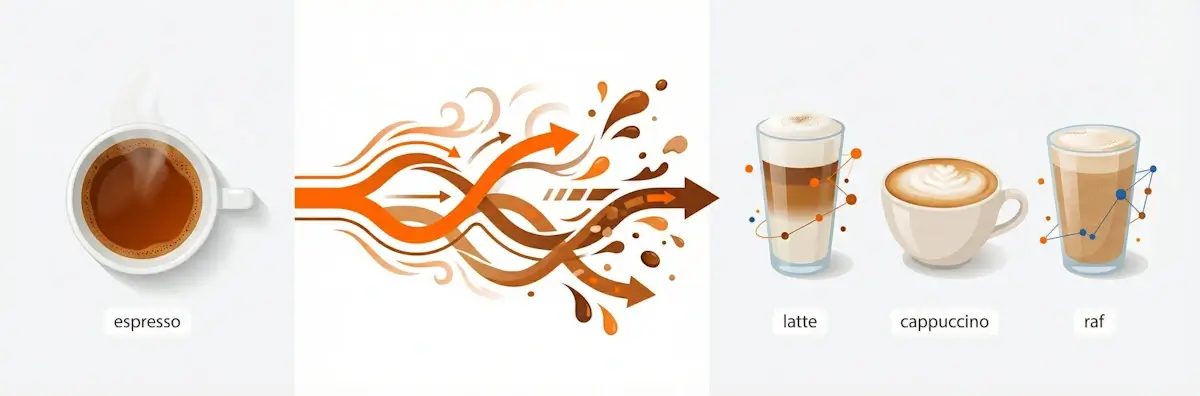
Think of it this way: Mutation works like a barista with a basic espresso shot: one base ingredient becomes dozens of drinks. Espresso + milk = latte. Espresso + foam = cappuccino. Espresso + cream + syrup = flavored specialty. The software does the same thing: it takes the word "password" and creates Password, password123, p@ssw0rd. One base–hundreds of variants to test.
What Is Password Mutation and How Does It Work?
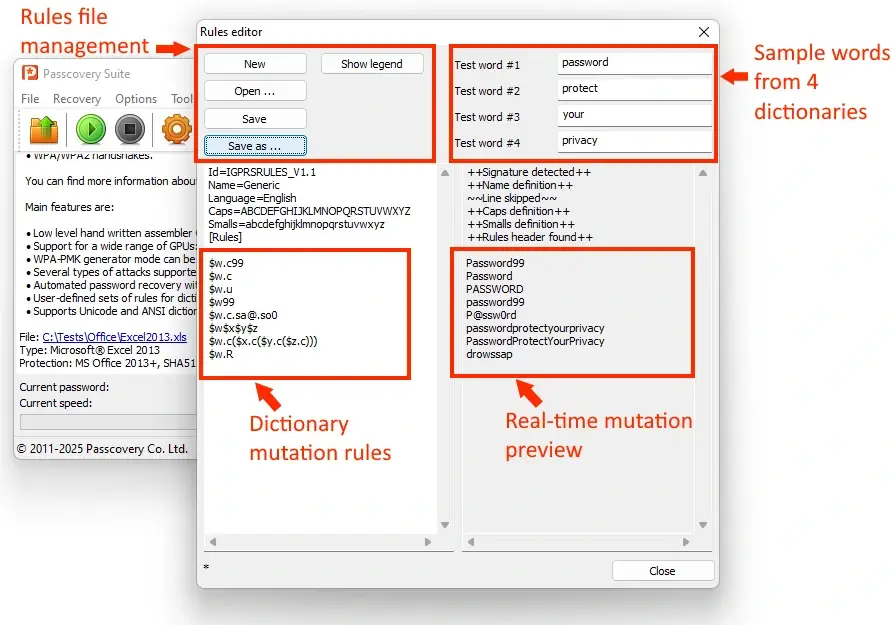
The software takes a word, applies a transformation rule, and generates a candidate for testing. For example: the word password + rule .c99 (capitalize first letter + append "99") = Password99. This is called a rule-based attack–a dictionary attack with transformation rules.
The principle is simple: mutation expands your dictionary without increasing its size. Instead of storing 10 million pre-made passwords, the software keeps 10 thousand base words and a set of rules. Rules generate variants on the fly–this is candidate generation.
Here's how the process looks:
| Source Word | Rule | Result | What Happens |
|---|---|---|---|
| password | .c |
Password | Capitalize first letter |
| password | .u |
PASSWORD | All letters uppercase |
| password | .c.sa@.so0 |
P@ssw0rd | Capitalize + replace a→@, o→0 |
| password + protect + your + privacy | $w$x$y$z |
passwordprotectyourprivacy | Concatenate four words |
| password + protect + your + privacy | $w.c($x.c($y.c($z.c))) |
PasswordProtectYourPrivacy | Concatenate four words + capitalize each |
Each rule is a transformation instruction. Passcovery, Hashcat, and John the Ripper all use a macro language to define rules. The modifier .l converts letters to lowercase, .R reverses the word.
Why does this work? Mutation doesn't invent words–it mimics human behavior. And humans are predictable:
according to NIST data, when required to create a "complex password," 82% of users come up with combinations like Password123!.
If you remember your password's structure–the base word, added numbers, letter substitutions–mutation will find it in minutes. For truly random combinations, mask attack or brute force works better.
What Are the Most Common Mutation Rules?
Four patterns cover 70-80% of real-world passwords: leet-speak, case toggling, number appending, and word combining. Software checks these first.
| Pattern | What It Does | Example Rule |
|---|---|---|
| Leet-speak (letter-to-symbol substitution) | Replaces letters with similar-looking characters: a→@, e→3, i→1, o→0, s→$ | .sa@.se3 |
| Case toggling | Changes case: capitalize first, all caps, invert case | .c, .u, .t |
| Numbers | Appends years, dates, sequences: 123, 2024, 1990 | $1$2$3 |
| Combinator | Concatenates two or three words from different dictionaries | $w$x |
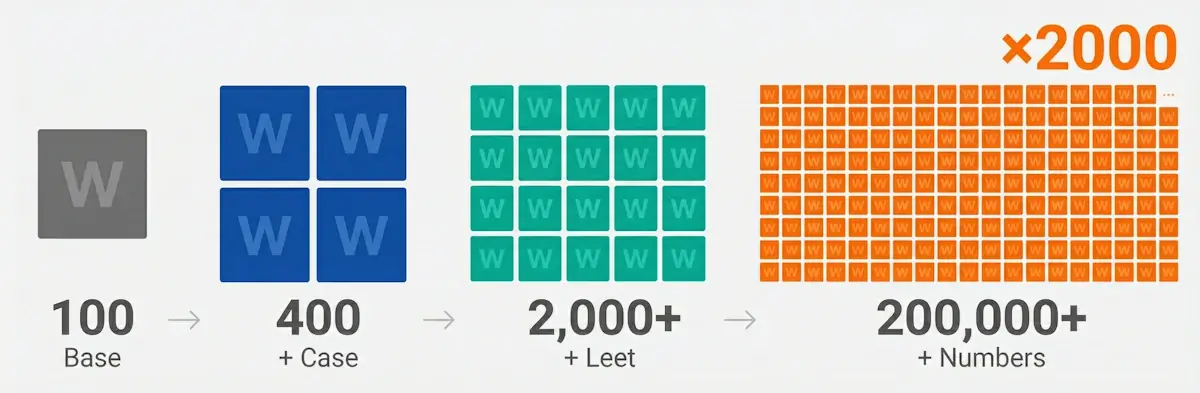
Mutation effectiveness in numbers
- Dictionary of 100 words → 100 passwords
- + case rules → 400 passwords
- + leet-speak → 2,000+ passwords
- + numbers (00-99) → 200,000+ passwords
Result: search space expansion of 2,000x or more, without increasing dictionary size.
Passcovery's rule syntax is similar to Hashcat and John the Ripper, but has some differences. For example, $w.c$x.l means: take a word from the first
dictionary with a capital letter, add a word from the second in lowercase. The complete list is in the help documentation for each Passcovery program; Hashcat users
will recognize familiar patterns.
When Is Mutation Effective–and When Isn't It?
Mutation works when you remember your password's structure. For random combinations like 7xKnmQ2, it's useless. Mask attack is better for those.
| ✅ Mutation Is Effective | ❌ Mutation Won't Help |
|---|---|
| You remember the base: a word, name, or date | Password from a random character generator |
| Password follows "word + modification" logic | You only have "mask-type" info about possible structure |
| You know the structure: word-numbers-symbol | Short password (4-6 characters)–full brute force is simpler |
| You have data about habits: favorite team, birth date | Fast format (ZIP, Office 97-2003)–dictionary reading may be slower than brute force |
Denis Gladysh, head of Passcovery:
"Remember that your password was based on words? Build a dictionary of possible words, and a mutation attack will crack it in minutes. For generator passwords, switch to mask or brute force. These are different tools for different jobs.
Real-world example: recovering an Apple iOS backup password with a 'word-numbers-word' structure. The user
remembered fragments (fre, frett, 2323, 2424) but not the exact combination. Mutation checked 7,000 variants
and found the password in 10 minutes. Full brute force for an Apple iOS backup would have taken centuries."
How to Create Mutation Rules for Your Situation
Open the Rules Editor in your Passcovery program, describe transformations using macros, and test on sample words. This takes some setup time, but well-crafted rules will save days of brute forcing.
The Rules Editor is a visual tool: enter test words, define rules, and see results instantly. Syntax errors are caught before you start the attack.
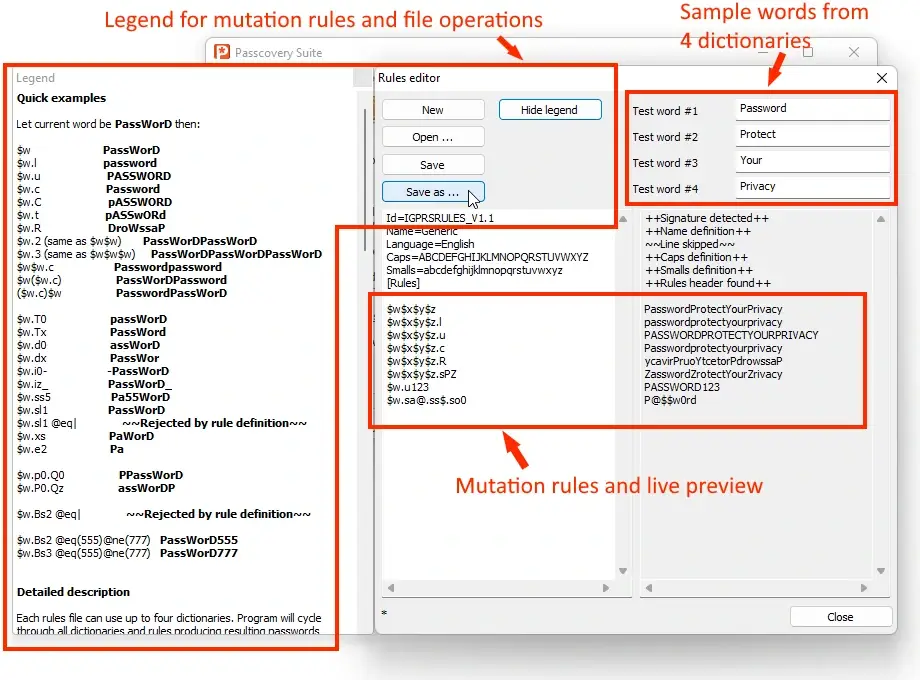
Basic syntax:
| Group | Macro | Action |
|---|---|---|
| Dictionaries | $w |
Word from first dictionary |
$x |
Word from second dictionary | |
$y |
Word from third dictionary | |
$z |
Word from fourth dictionary | |
| Case | .l |
All letters to lowercase |
.u |
All letters to uppercase | |
.c |
Capitalize first, lowercase rest | |
| Transformations | .R |
Reverse the word (password → drowssap) |
.sXY |
Replace all X with Y |
Denis Gladysh, head of Passcovery:
"Start with basic rules: case, leet-speak, numbers. Didn't work? Add complexity. Excessive mutation can generate millions of useless variants and slow down your search instead of speeding it up."
Ready-made rules for some typical scenarios:
$w.c– word with first letter capitalized$w.u123– word in uppercase + "123" at the end$w.sa@.se3.si1– leet-speak substitutions
For complex scenarios involving multiple dictionary combinations, automated multi-file checking, and attack chains for forgotten passwords, use automation through attack scripts. The complete reference for modifiers and operators is in the macro language syntax documentation.
Where Password Mutation Is Used
Rule-based dictionary attack with mutation is available in all Passcovery products:
- Passcovery Suite for Microsoft Office / OpenOffice / PDF / RAR / ZIP / TrueCrypt / Apple iOS / Blackberry OS / WPA/WPA2
- Accent OFFICE Password Recovery for Microsoft Office / OpenOffice / LibreOffice
- Accent PDF Password Recovery for Adobe PDF
- Accent RAR Password Recovery for RAR3 / RAR5
- Accent ZIP Password Recovery for Zip / WinZip AES
All programs share the same interface and identical mutation rule syntax.
FAQ: Common Questions About Mutation
It depends on the file format. Classic ZIP–billions/sec, RAR5–thousands/sec, Office 2016+–hundreds/sec. Speed is determined by the protection algorithm: modern formats use "slow" KDFs specifically to defend against brute forcing.
Yes, up to 4 dictionaries simultaneously. The rule $w$x will concatenate words from the first and second dictionaries. Useful for passwords like "firstname+lastname",
"word+year", "two pet names". The rule $w$x$y$z combines words from all four dictionaries.
The Rules Editor in Passcovery programs includes hints and instant preview of the rules you create. Rules from Hashcat (best64, dive) can be adapted since the syntax is similar. But the best rule set is one you create for your specific task. Analyze your forgotten password's structure, build the right dictionary, define the right rules.
When all variants have been tested but the password wasn't found. There are two possibilities: either the word isn't in your dictionary, or your rules don't cover the needed transformation. Expand your dictionary and mutation rules, or switch to brute force with a password mask.
According to Have I Been Pwned statistics, most passwords follow typical patterns–if yours wasn't found, you probably just didn't include the right template. But it's also possible your lost password is truly unique.

Author: Denis Gladysh,
Co-owner and Head of Passcovery. Passcovery is a provider of high-speed
GPU-accelerated software solutions for recovering passwords for popular file formats. Denis is the author of the first versions of
Accent OFFICE Password Recovery, created in 1999.


jp: パスワード変異攻撃:Passcoveryにおける辞書攻撃ルール
cn: 密码变异:Passcovery 中的字典攻击规则
pt: Mutação de Senhas: Regras de Ataque de Dicionário no Passcovery
ru: Мутация паролей: правила атаки по словарю в Passcovery