17 Excel Files Locked - How to Remove Protection and What It Costs
A user sent us 17 password-protected Excel files and asked: what's the cheapest way to decrypt them? Here's the cost breakdown, how the service works, and what to do if the file format isn't supported.
What Does It Cost to Decrypt 17 Excel Files?
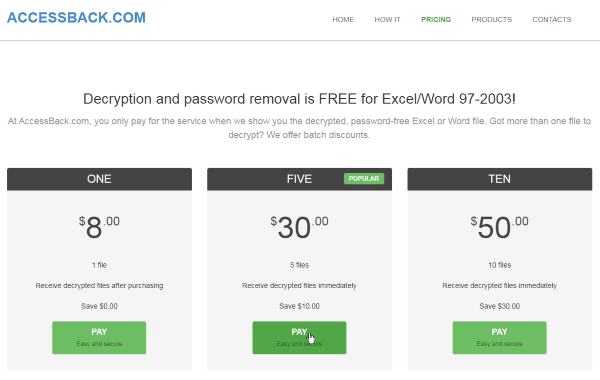
One file, one credit. Credits are sold individually ($8) and in bundles. Bigger bundles mean a lower per-file cost.
| Payment option | Formula | Total | Credits left over |
|---|---|---|---|
| 17 files individually ($8/each) | 17 × $8 | $136 | 0 |
| 3 medium bundles + 2 singles | 3×$30 + 2×$8 | $106 | 0 |
| 2 bundles of 10 credits ✓ | 2 × $50 | $100 | 3 credits to spare |
For 17 files, the best deal is two 10-credit bundles ($100). That's $36 less than paying per file, and you get three credits left over for next time. Current prices and the order form are on the service's website.
The same logic applies to any number of files. Five files? A medium bundle ($30) beats paying individually ($40). Ten – one large bundle. Thirty – three bundles of 10. The rule is simple: the more files you have, the more you save with bundles.
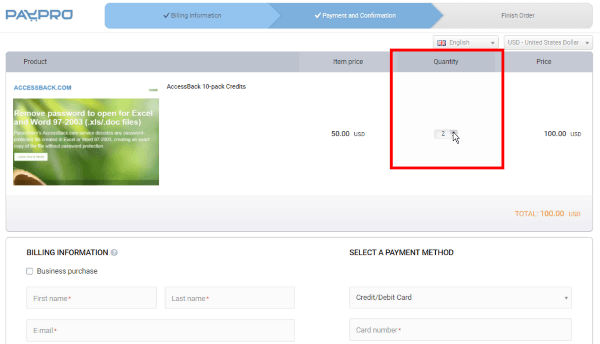
You can select the number of bundles right in the order form – just set the quantity before checkout.
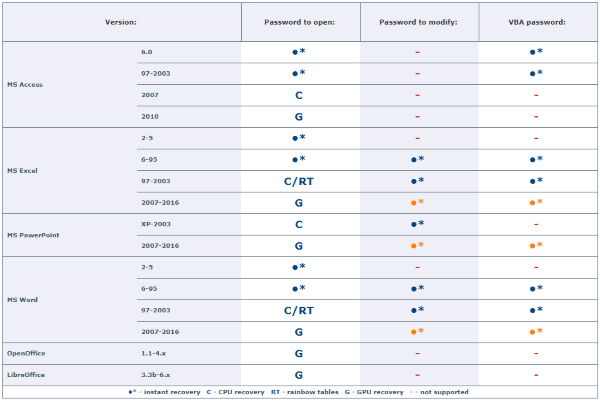
Important detail: credits only work for files with 40-bit encryption – that means Microsoft Office 97-2003 documents (xls and doc) and early versions of Adobe PDF. They all use the RC4 stream cipher with a short 40-bit key, which is what makes guaranteed decryption possible. Why 40 bits specifically? I'll explain below.
How It Works: Results First, Payment Second
The service decrypts your file for free and sends you a screenshot – a fragment of the decrypted, open document. That's your proof: the data is accessible and the protection is gone. From there, the decision is yours: need the file – buy a credit and get the full document without password protection. Don't need it – don't pay.
Why does this matter even more with 17 files? Upload all of them before buying any credits. The service will send a screenshot for each one. That way you'll know they're all compatible and contain the data you need before spending a dime.
Expert tip: how to verify decryption results before paying
Denis Gladysh, head of Passcovery:
Don't buy credits until you've seen the results. Upload your protected Excel, Word, or PDF files to AccessBack.com, wait for the decryption screenshot on each one – then pick your bundle and pay.
The full workflow – from uploading a file to getting the decrypted document – is in this video walkthrough:
How does decryption actually work? There's a key distinction to understand. Decryption means finding the encryption key. Password recovery means brute-forcing the password itself. AccessBack.com takes the first route: it finds the key, not the password.
The service locates the 40-bit key using rainbow tables – a massive array of precomputed key-to-data matches built by Passcovery's team. That key decrypts the document directly, and the password remains unknown.
Picture a pond with a key resting on the bottom. To grab it, you need to drain the pond and map the floor. For Office 97-2003, that "pond" holds a trillion (240) possible keys: Passcovery drained it, mapped it, and now the service finds the right key in minutes. For Office 2007-2021, the pond turns into an ocean – 2128 to 2256 possible keys. Draining the ocean? Not going to happen.
If the screenshot shows less data than you expected, check what the decryption screenshot means. And a question that comes up a lot: if decryption is free, what exactly are you paying for?
xlsx or docx Files – Will the Service Work?
AccessBack.com does not support Office 2007-2021 formats. Starting with Office 2007, Microsoft switched to the AES block cipher with 128-256 bit keys. The key space (2128 values and beyond) is so vast that building rainbow tables for it is physically impossible. The technical explanation is in our article on why xlsx files can't be decrypted without the password.
For those files, the only option is recovering the original password by brute force. Passcovery software accelerates brute force on GPUs from NVIDIA, AMD, and Intel Arc – tens of times faster than CPU alone. To narrow down the search, it offers three tools:
- Positional mask – define allowed characters for each position in the password
- Dictionary mutations – thousands of variations of a known word based on custom rules
- Attack scenarios – a sequence of checks with different settings, run back to back
Download free trial versions of Passcovery's Microsoft Office password recovery software from the Passcovery website.
About the Author

Denis Gladysh, co-owner and head of Passcovery – a provider of high-speed GPU-accelerated password recovery software for popular file formats. Author of the original Accent OFFICE Password Recovery, first released in 1999.


Frequently Asked Questions About Decryption on AccessBack.com
Upload the file to AccessBack.com – the service will find the encryption key using Passcovery's rainbow tables, no password needed. This works for Excel, Word, and PDF files with 40-bit encryption (Office 97-2003 formats and PDF 1.2). The password itself isn't recovered – the service removes protection directly through the key. For modern xlsx/docx and AES-encrypted PDF formats, this method won't work – you'll need password recovery by brute force.
AccessBack.com decrypts three formats: Excel (xls), Word (doc), and early PDF (version 1.2). What they have in common: all three use RC4 encryption with a 40-bit key. The credit system works the same for all of them – one file, one credit, regardless of format.
Decryption finds the encryption key, not the password itself. AccessBack.com locates the 40-bit key using Passcovery's rainbow tables and removes protection in minutes. The password stays unknown throughout. Password recovery is a different process entirely: software brute-forces the actual password. That's the only option for xlsx/docx and AES-encrypted PDF files, where rainbow tables can't be built.
Yes, the service decrypts your file for free. After uploading, you'll get a screenshot showing a fragment of the open document. That's your proof: protection removed, data intact. You only buy a credit if you actually want the file. Don't need it? Don't pay. The screenshot typically arrives within an hour, though during peak load the service guarantees a response within 24 hours.
Files are transmitted over HTTPS and automatically deleted from the server after 7 days. Only the decryption system and the service administrator have access to uploaded documents. We do not share files with third parties or use their contents in any way.