Best Way to Recover an XLSX Excel File Password
Q: I need to recover a password for an xlsx file. What's the "best way" or "best program" to do it?
A: XLSX files are Microsoft Excel 2007–2024 documents encrypted with AES. The only way to recover the password is brute force (trying every possible combination), and success isn't guaranteed: the more complex the forgotten password, the longer the search.

The good news: there are two ways to cut recovery time dramatically:
- GPU acceleration on NVIDIA/AMD/Intel Arc graphics cards
- narrowing the search range with masks and dictionaries
When you're choosing software, these two capabilities are what decide the outcome.
Everything above applies equally to Microsoft PowerPoint (pptx) and Word (docx) files: the encryption and password recovery methods are identical across all Microsoft Office formats.
Try Accent OFFICE Password Recovery by Passcovery. The program supports GPU acceleration and flexible attack setup for Microsoft Office files of every version.
 |
Accent OFFICE Password Recovery for all versions of Microsoft Office and OpenOffice/LibreOffice files |
|
| ||
An XLSX Open Password Can Only Be Recovered by Brute Force — No Backdoors
XLSX/DOCX/PPTX files in Office 2007–2024 use AES encryption with a 128- or 256-bit key – a federal standard adopted by the National Institute of Standards and Technology. The password itself isn't stored in the file: the encryption key is derived from it by the PBKDF2 function, which runs the password through tens of thousands of hashing iterations. Without the correct password, the file contents are just a random stream of bytes. There are no workarounds or backdoors to break the encryption.
Two Types of Excel Protection: What's Instant vs. What Needs Brute Force
Sheet, workbook, editing-restriction, and VBA passwords come off instantly and for free, while an "open password" with AES encryption requires brute force. The type of protection determines the method, the time, and the chances of success:
| Protection type | Difficulty | What to do |
|---|---|---|
| Sheet/workbook protection, editing restriction, VBA password | Removed instantly, in any version of Excel | Free scripts or AccentOPR |
| Open password (AES‑encryption) | Requires brute force | AccentOPR with GPU‑acceleration |
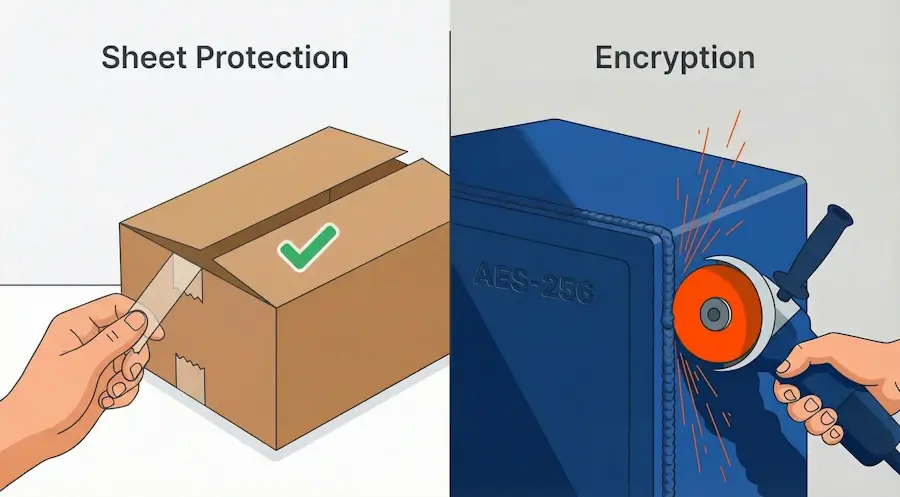
Excel sheet protection (and the other simple kinds) is tape on a box: anyone can peel it off in a second, contents intact.
Encryption with an open password is a different animal. It's a welded seam: without an angle grinder (brute force) you can't cut through, and the thickness of the weld (password length and complexity) decides how long the cutting takes.
Free scripts handle the "tape": sheet protection comes off in a minute. For the "welded seam," you need AccentOPR with GPU‑acceleration.
An .xls (Excel 97–2003) Password Is Removed Without Brute Force — Short RC4 Key
Classic .xls files (Excel 97–2003) open without a search: they use a short 40-bit RC4 key, and the attack goes straight for the key. Fast, with a 100% guarantee, including online. This is the exception to everything above: it holds only for .xls, while xlsx (Excel 2007–2024, AES-128/256) still requires brute force.
Two Ways to Speed Up XLSX Recovery: GPU Acceleration and Narrowing the Search
GPU Acceleration: Brute Force Tens of Times Faster Than CPU
GPU acceleration on NVIDIA, AMD, and Intel Arc graphics cards makes brute force tens of times faster than on a CPU (speed benchmarks across GPUs). For xlsx/docx/pptx this is critical: the difference between days of waiting on a CPU and hours on a GPU can be decisive.
A graphics card is faster because password cracking maps perfectly onto the parallel GPU architecture: thousands of cores test thousands of combinations at once. CUDA and OpenCL deliver a substantial speed boost here.
Masks and Dictionaries Test Only Likely Password Candidates
A mask and a dictionary don't test everything under the sun — only candidates that resemble your password. If you remember anything at all about the forgotten password, it immediately cuts out billions of pointless combinations:
- a positional mask assigns character sets individually for each position in the password
- dictionary merging and mutation covers passwords built from modified words
Expert Tip: Narrow the Search Range Before You Launch
Denis Gladysh, head of Passcovery:
Narrow the search range before you start the program. Recall the approximate password length, what characters you used, whether it contained words or dates. Every detail like this cuts search time by orders of magnitude — sometimes from years to hours.
Simpler Excel Protection Can Be Removed for Free: VBA, ZIP/XML, Legacy-xls Online
Beyond brute force, there are free methods for the simpler protection types: VBA scripts, the ZIP method for editing XML metadata inside xlsx files (the format is built on the open Office Open XML (ECMA-376) standard), and online services for decrypting classic xls files. Each method works within its own limits and for specific versions of Excel, Word, and PowerPoint.
A detailed breakdown of every method – from free scripts to professional tools with GPU acceleration – is in the article "How to Crack, Break or Just Remove a Forgotten Excel Password for Free/a Fee".
When an XLSX Password Can't Be Recovered
There are three cases where an xlsx password won't be recovered — and all three are false hopes, not methods:
- Betting on a guarantee. For xlsx (Excel 2007–2024, AES-128/256) there's no guaranteed result: that's how strong encryption like AES is built. Classic .xls files (Excel 97–2003) are the exception, but that's a different format with a short encryption key.
- Betting on a backdoor. The password isn't stored in an xlsx file: the encryption key is derived by the PBKDF2 function. There's no getting around AES encryption — you can only search for the password.
- Betting on free online tools. Free cloud services are powerless against xlsx: hundreds of passwords per second versus tens of thousands on your own graphics card. For xlsx, only a full search on your own machine works.
And even brute force runs into the wall of time: a long xlsx password with mixed-case letters, digits, and special characters stretches into hundreds of years even on a top-tier graphics card. Looks like a dead end.
Yes and no — it's not a dead end. Brute force finds any password; the only question is how many combinations you have to test (and how long that takes), and you can cut that down by orders of magnitude. Set the password structure with a positional mask. Add a dictionary with mutations if the password was a word. Run the search on a GPU. A mask, a dictionary, and a graphics card together squeeze the timeline from "centuries" to "days," and that seeming dead end with a long password becomes a matter of time, not a verdict.
About the Author

Author:
Denis Gladysh,
co-owner and head of
Passcovery,
a maker of high-speed, GPU-accelerated password recovery software for popular file formats.
Denis wrote the first versions of Accent OFFICE Password Recovery back in 1999.


Frequently Asked Questions About Excel Password Recovery
Is Excel Password Recovery Legal — Can I Crack My Own File?
Yes, as long as it's your data or you're authorized to access it.
Here's when password recovery is a perfectly routine task:
- you forgot the password to your own work or personal file
- an employee left the company without handing over document passwords
- a former employee deliberately locked corporate files
- your company is running an internal audit or investigation
- you need to pull data out of old archives or backups
Recovering passwords on files you don't own or aren't authorized to access is illegal. Accent OFFICE Password Recovery is built for files you have a legitimate right to open.
How Long Does It Take to Crack a Forgotten XLSX Password with GPU Acceleration?
Anywhere from minutes to "never." Excel password recovery time depends on three things: password length, character set, and format version. Length and character set set the search space, while the format version controls recovery speed through the number of key stretching iterations (the spinCount parameter).
Below are estimates for Excel 2013–2024 (AES-256, SHA-512, spinCount = 100,000). This is full brute-force time without any mask:
| Password length | Character set | RTX 4060 | RTX 5090 |
|---|---|---|---|
| 6 characters | lowercase (a–z) | ~6 hours | ~1 hour |
| 6 characters | lowercase + digits | ~1.9 days | ~8 hours |
| 8 characters | lowercase (a–z) | ~6 months | ~1 month |
| 8 characters | mixed-case + digits | ~512 years | ~89 years |
| 10 characters | all printable ASCII | millions of years | millions of years |
Excel 2007 (AES-128, SHA-1, spinCount = 50,000) cracks considerably faster: the RTX 4060 delivers ~186,700 p/s, and the RTX 5090 tops one million. The same 8-character lowercase password that would take Excel 2024 half a year is found in a couple of weeks on an RTX 4060 and in a couple of days on an RTX 5090. For how the method and time depend on the Excel version and protection type, see the overview of recovery methods.
The search space grows exponentially, by the formula (character set size)password length. For a 62-character alphabet (a–z, A–Z, 0–9), every extra character in the password multiplies the number of candidates by 62. Even a top-tier RTX 5090 won't help if the password is long and mixes upper- and lowercase letters, digits, and special characters. That's why brute-forcing the whole search space blindly is a bad idea: a positional mask and a dictionary attack with mutations shrink it by orders of magnitude and turn "years" into days.
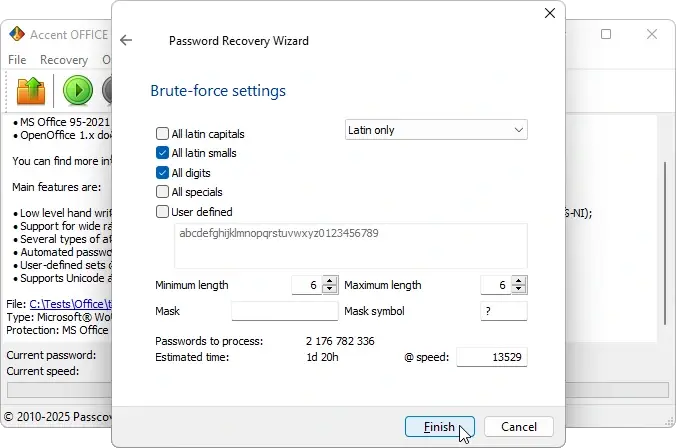
AccentOPR does all this math for you. While you set up a task, the program shows the number of combinations and the estimated recovery time before you hit Start. You can see right away whether it's worth the wait or whether you should narrow the range with a mask.
Can I Recover the Password from an XLSX File Online, or Do I Need to Install Software?
For an xlsx file with an open password — realistically, no. Excel 2007–2024 files are encrypted with AES-128/256 and key stretching: the algorithm deliberately slows down every verification attempt. An online service checks a few hundred passwords per second; a graphics card on your own machine checks tens of thousands. An online tool might handle a trivial password like "123," but anything real is out of reach.
That's why xlsx recovery calls for AccentOPR installed locally. Your file never leaves your computer, the cracking runs on your own GPU, and the speed difference compared to the cloud is orders of magnitude.
Older formats are a different story, though. Files with RC4 encryption and a short 40-bit key can be decrypted online with guaranteed results. The AccessBack.com service handles xls (Excel 97–2003), doc (Word 97–2003), and PDF 1.0–1.4.
How Does a Mask Attack Help Recover a Forgotten Excel Password Faster?
A mask narrows the search space: instead of trying every possible combination, the program only checks candidates that match the password structure you remember.
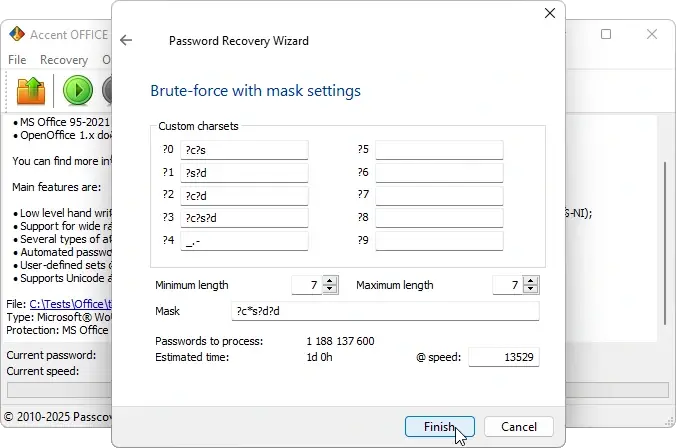
Here's how it plays out with real numbers. A 7-character password, a GeForce RTX 4060 GPU, Excel 2024, recovery speed ~13,500 p/s:
- Full brute force over the whole alphabet (a–z, A–Z, 0–9): 3.5 trillion combinations. That's over 8 years of waiting
- Mask
?c*s?d?d(you recall: capital letter first, lowercase in the middle, two digits at the end): 1.19 billion combinations. That's about 24 hours
One hint about the password's structure turned 8 years into 24 hours. It's called a positional mask in AccentOPR because each position in the password gets its own character set. Syntax details and examples are in a dedicated article.
Does an Excel 2013–2024 Password Take Longer to Crack Than an Excel 2007 File?
Yes — several times longer. Microsoft tightened protection with every release, and each upgrade hits recovery speed directly:
- Excel 2007: AES-128, SHA-1 hash, 50,000 key stretching iterations. The fastest modern format to brute-force
- Excel 2010: AES-128, SHA-1 hash, but 100,000 iterations. Recovery is twice as slow as 2007
- Excel 2013–2024: AES-256, SHA-512 hash, 100,000 iterations. SHA-512 is computationally heavier than SHA-1, slowing things down by several more times
Bottom line: the very same password on an Excel 2007 file is found several times faster than on Excel 2013+. For newer formats, GPU acceleration goes from nice-to-have to a must.
Everything above applies equally to Microsoft PowerPoint (pptx) and Word (docx) files: the encryption algorithms and hash iteration counts are identical across versions.