Problems with Apple iOS 10.2-26 Backup Password Recovery
In 2016, with the release of iOS 10.2, Apple introduced serious security measures to protect iOS backups from GPU-accelerated password recovery. These measures will remain active through iOS 26 in 2025.
Apple significantly increased the complexity of password brute-forcing by replacing the previously used 10,000 iterations of the PBKDF2 function with SHA1 hashing with 10,000,000 iterations of the PBKDF2 function with SHA256 hashing.
The updated encryption algorithms dramatically slowed down password guessing attacks for iPhone/iPad backup passwords.
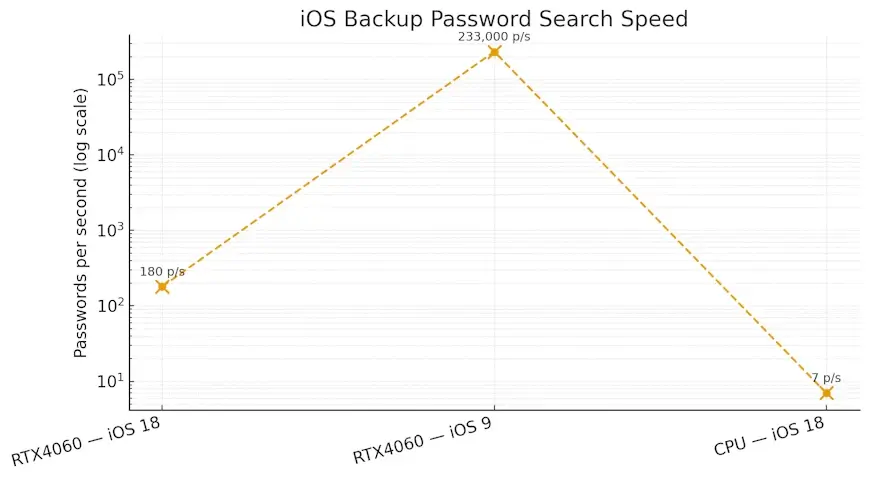
For example, in Passcovery Suite, the password recovery speed for iOS 10.2-26 backups on an NVIDIA GeForce RTX 4060 graphics card is only
about 180 passwords per second, compared to 233,000 for previous iOS versions (4-10.1).
The speed of brute forcing has dropped several-fold.
That does not only concern Passcovery Suite, but all password recovery programs that support Apple iOS 10.2-26 backup files. Such changes in performance are not due to program efficiency, but due to security improvement.
Increased amount of calculations in Passcovery Suite also affected the attack status saving function (.prs file).
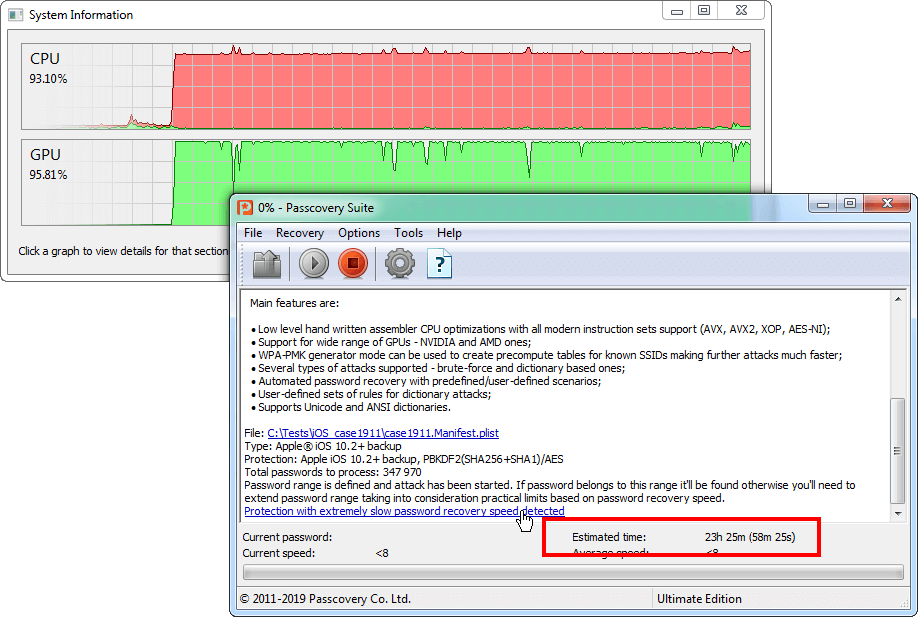
During preliminary computing of a data block (execution of 10M iterations of PBKDF2 algorithm for each password in the block) performed by graphics cards, there are no data to be saved in the program. The software can only save the attack status after processing the entire block and receiving results from GPU. If you interrupt the process, you will lose all data that have already been computed for this particular data block, and the search status file will only contain information about the previously checked block.
In the program interface, estimated calculation time of data block sent to GPU is indicated in brackets next to the entire range calculation time.
Apple was among the first to apply recommendations proposed in RFC 8018 (10M iterations for PBKDF2) and implement really die-hard protection of Apple iOS backup files.
This yet once again emphasized the importance of range customization options in password recovery programs. The key to successful recovery of Apple iOS backup file would be the ability to cut off necessary ranges and use the maximum speed possible with the existing hardware.
Passcovery Suite Solutions for Apple iOS Backup Files
Passcovery Suite is a universal GPU-accelerated program to recover passwords of popular file formats. Among its competitors, Passcovery demonstrates consistently high speed of brute force. Extra acceleration on NVIDIA/AMD/Intel graphics cards.
Passcovery Suite recovers passwords for Apple iOS 4-26 backup files for iPhone 3G – iPhone 17 and iPad (1st-11th gen).
It offers search range manipulation techniques:
- positional mask for brute force attack (allows you to specify character sets individually for each password position) – usage examples
- password mutations for dictionary attack (allows you to combine up to 4 dictionaries and modify resulting passwords according to specified rules) – usage example
More details and free demo:
 |
Passcovery Suite for Apple iOS backups, Microsoft Office, OpenOffice, LibreOffice, Adobe PDF files, Zip, RAR, TrueCrypt, WPA/WPA2 |
25.04 | Download x64 (17896 Kb) |
|
| ||||
Frequently Asked Questions About iOS Backup Password Recovery
Recovery time depends on password complexity and hardware performance. For example, an NVIDIA GeForce RTX 4060 graphics card checks approximately 180 passwords per second when working with iOS 18 backups (the speed is identical for iOS 10.2–26). This means that a brute-force attack on a 5-character lowercase password will take approximately 19 hours, while a 5-character password with letters and digits will take about 4 days.
This is precisely why it's critical for real-world tasks to use dictionary attacks with mutations, as well as simple or positional masks. Such methods reduce search time to minutes or hours and significantly increase the chances of successful recovery.
The choice of method depends on what you remember about your password:
- Dictionary attack with mutations: optimal if the password contains words, names, dates, or their variations. You can prepare a personal dictionary, and Passcovery Suite will automatically create and check possible variants of the lost password according to specified rules (example here).
- Simple or positional mask attack: suitable if you know the password structure or individual elements (for example: "starts with a capital letter and ends with two digits" or "begins with the word Sklad, then unknown"). A mask can reduce the search space by more than 90%, since only variants matching the specified structure are checked (examples here).
- Brute force: a last resort for completely unknown passwords up to 5 characters in length. For iOS passwords, this method is practically ineffective due to extremely long search times.
Apple significantly increased the security level: the number of PBKDF2/SHA256 iterations was increased from 10,000 (iOS 4–10.1) to 10 million in iOS 10.2 and later, which complies with RFC 8018 recommendations.
Because of this, each password attempt requires approximately 1000 times more computations. While old iOS backups could be checked at a speed of 233,000 passwords per second, for iOS 10.2–26 the speed on the same hardware (NVIDIA GeForce RTX 4060) is only 180 passwords per second.
For Mac users: open the Keychain Access app and search for the "iOS Backup" entry. If you selected "Remember password" when encrypting the backup, it's stored there and can be recovered.
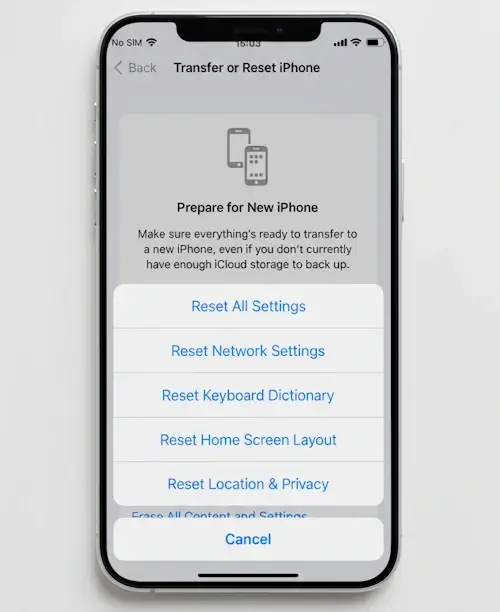
For devices with iOS 11 and later: you can reset encryption through Settings > General > Reset > Reset All Settings. This will remove the password requirement for future backups, but won't allow access to already existing encrypted backups.
Without the password or specialized software, encrypted iOS backups cannot be recovered.
For iOS 10.2–26 backups, interrupting the attack results in losing the progress of the current GPU data block being processed. Passcovery Suite saves recovery status (.prs file) only after completing the processing of each block. The program displays the estimated block processing time in brackets next to the total time.
To minimize progress loss, wait for the block to complete and the status file to update before stopping the process. For maximum efficiency, it's recommended to run password recovery during off-hours when GPU access won't be interrupted.
Passcovery Suite supports two types of masks for password recovery:
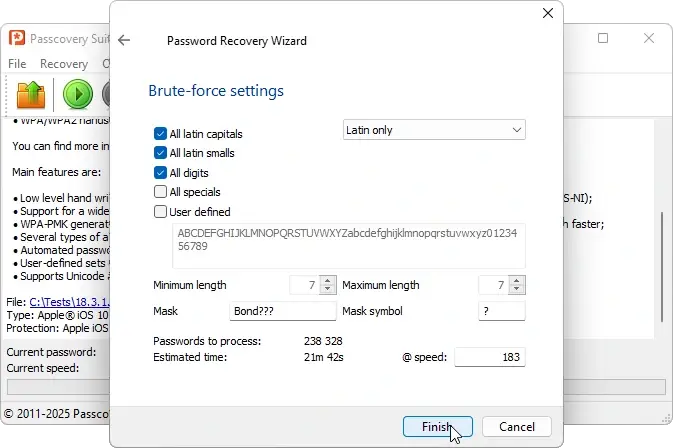
- Simple mask (example: "begins with the word Sklad, then unknown – Sklad????").
In the mask, the known part of the password is fixed, and unknown positions are replaced with the ? symbol.
The known part doesn't change, and for unknown positions, brute force is performed according to selected alphabets and character sets.
![Simple mask configuration window in Passcovery programs]()
Simple mask configuration in Passcovery Suite - Positional mask (example: "starts with a capital letter and ends with two digits – ?c*s?d?d").
For each position, its own character set is specified: for the known part – limited, for unknown parts – full or custom.
As a result, brute force is performed only with characters allowed for each specific position
(see examples).
![Positional mask configuration window in Passcovery programs]()
Extended (positional) mask configuration in Passcovery Suite
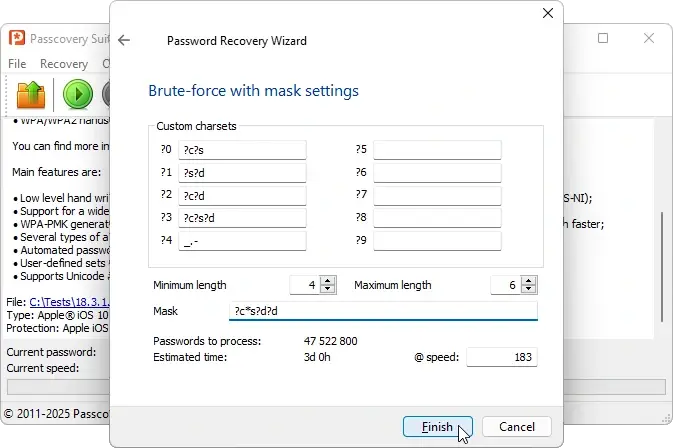
Precise control over password structure allows you to reduce recovery time from years to hours or days by eliminating obviously unsuitable combinations.
Absolutely. All iOS versions 10.2–26 use a unified and extremely resource-intensive protection scheme – 10 million PBKDF2/SHA256 iterations. Passcovery Suite utilizes the computational capabilities of NVIDIA, AMD, and Intel graphics cards, increasing recovery speed to several dozen or hundreds of passwords per second depending on the GPU model (on CPU – less than 10!).
The high cryptographic strength of iOS imposes natural limitations: strong passwords of five characters or more remain computationally intensive to recover. But GPU acceleration is precisely what transforms the task from practically impossible to realistically achievable – provided you use the right strategy (dictionaries, masks) and have at least partial knowledge of the password structure. For iOS 10.2–26, this is often the boundary between a fruitless attempt and successful recovery.
Additionally, Passcovery Suite supports GPU acceleration for earlier iOS 4–10.1 backups, where speed is significantly higher – up to tens and hundreds of thousands of passwords per second.