How to Cut Brute-force Time if You Know Part of the Password?
Yes, dramatically so. Masks reduce brute-force attempts by hundreds and thousands of times. You only test realistic candidates, eliminating combinations that definitely won't work.
Brute-force speed is measured in passwords per second and depends on your hardware – that's a constant. But you control the number of variants to check. The more precisely you describe the password structure, the faster you'll find what you need.
See how the number of variants changes based on length, character set, and mask:
How Do Length and Character Set Affect the Number of Variants?
Each additional character multiplies the number of combinations. This is exponential growth, not linear. A 6-digit password gives you a million variants. Add a seventh digit and you need to check 10 million. An eighth – 100 million.
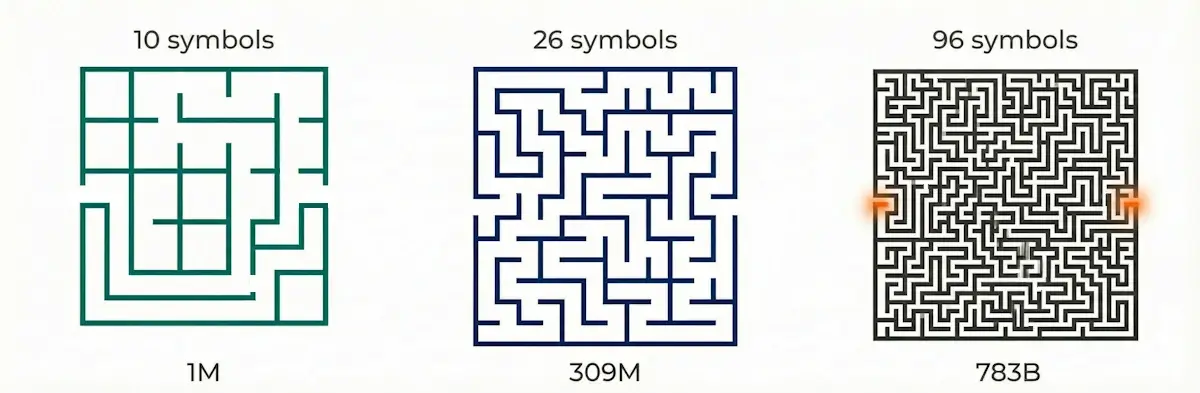
Character set matters even more. Compare the search space for a 6-character password:
- Digits only (10 characters): 1,000,000 variants
- Lowercase letters (26 characters): 309 million
- All printable ASCII (96 characters) : 783 billion
The difference between "digits only" and "all characters" is 783,000 times. That's why knowing which characters were used in the password can be critical. It's the difference between "taking a stroll through a maze" and "walked in and never came out."
What Is a Mask and How Does It Reduce Brute-Force?
A mask is a password template with a partially known structure. Unlike dictionary attacks, masks don't require a ready-made password list. You lock in what you remember, and the program only tests unknown positions. Checking obviously wrong variants is eliminated.
Simple Mask (Mask Attack): When You Know Some Characters
If you remember the beginning, end, or part of the password, just lock those characters in place and test the unknowns.
Say your password is 8 characters and you definitely know the first three: "Ann". Instead of testing all eight positions, the program only tests five unknowns. This reduces variants by 140,608 times (checking uppercase and lowercase, 52 characters).
Positional Mask: When You Remember Structure but Not Characters
A positional mask is a tool for cases where you remember not the characters themselves, but their type. For example: "started with uppercase, ended with digits." You specify allowed character sets for each position separately.
It's a middle ground between full brute-force and rigid masks. Why does this matter? Because most passwords follow patterns – and you can leverage that to cut search time.
A positional mask works like filters in a rideshare app. Instead of searching for any car in the city, you specify: black, premium, 4.9+ rating. The app doesn't cycle through all 100,500 vehicles, just the dozen that match.
Same with passwords. Remember it started with uppercase and ended with digits? Those are your "filters." The program won't check quadrillions of combinations, just millions: the difference between "never" and "by lunch."
The more filters, the faster the result.
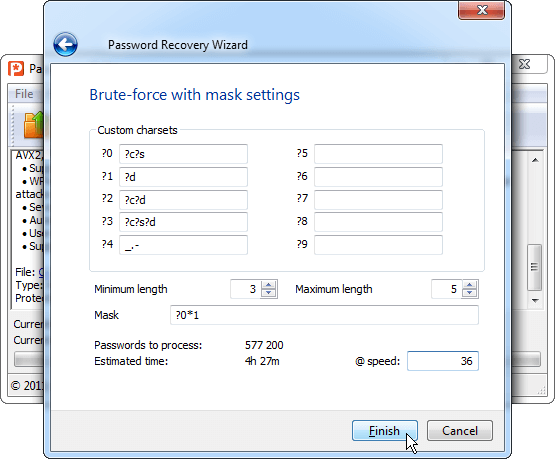
See detailed setup examples in the article "Advanced (Positional) Mask in Passcovery Programs".
Comparing Approaches
| Approach | What's Known | Variants (8-char password) | Reduction |
|---|---|---|---|
| Full Brute-Force | Nothing | ~7.2 quadrillion | – |
| Simple Mask | First 3 characters "Ann" | ~8.1 billion | 885,000× fewer |
| Positional Mask | Structure: uppercase + all printable + 2 digits | ~21.2 trillion | 340× fewer |
Expert Tip: Use Password Patterns
"Most people build passwords following a pattern: uppercase at the start, digits or special characters at the end. If that's your case – use a positional mask. It lets you specify "uppercase" only for the first position and "digits" only for the last ones, without testing all combinations everywhere." – Denis Gladysh, Head of Passcovery
How to Apply What You Remember About Your Password?
Don't try to recall the entire password. Remember your habits – they narrow the search just as well as specific characters.
Ask yourself three questions:
- How long are your passwords usually? (6-8 characters? 10+?)
- What do you start with: uppercase or lowercase?
- What do you end with: digits, a special character, or a letter?
Each answer eliminates millions and billions of unnecessary checks. Even approximate knowledge of the structure turns "years of brute-force" into "days or hours".
Expert Tip: Narrow Your Search Step by Step
"Start with length. If the password felt short – try 6-8 characters. Long – 10-12. Then recall the structure: what you started with, what you ended with. Each constraint eliminates millions of useless checks. The more conditions – the closer to success." – Denis Gladysh, Head of Passcovery
All Passcovery programs support both regular and positional masks and let you flexibly configure brute-force for your specific case.
Frequently Asked Questions
Depends on length, character set, mask, hardware speed, and file format.
An 8-character password from all printable ASCII without a mask – that's ~7.2 quadrillion variants. Even on a powerful GPU, brute-force takes days-years-millennia (depends on file format and its key derivation function (KDF) – more iterations mean slower checking). With a positional mask, the same password can be found in hours. Masks matter!
Two ways: more powerful hardware and a more precise mask.
Masks usually give bigger gains. Cutting variants by thousands of times outweighs GPU acceleration by tens of times. Best result – combination: precise mask + powerful GPU.
Lock the known characters in a simple mask.
If you remember not the characters themselves but their type (e.g., "started with uppercase") – use a positional mask. Even 2-3 known positions cut brute-force by orders of magnitude.
A regular mask locks specific characters: "Ann?????".
A positional mask specifies allowed sets for each position separately: "first – uppercase, last three – digits, etc." It's more flexible and suits cases where you remember the password structure but not the characters themselves.
Yes, GPUs accelerate brute-force by tens of times compared to CPUs.
But even a powerful GPU won't crack a long password in reasonable time without a mask. Compare GPU performance in the GPU ranking for password brute-force.

Author: Denis Gladysh,
Co-owner and Head of Passcovery. Passcovery is a provider of high-speed
GPU-accelerated software solutions for recovering passwords for popular file formats. Denis is the author of the first versions of
Accent OFFICE Password Recovery, created in 1999.


