What Is the Maximum Length of a RAR Password for Recovery in AccentRPR?
Passcovery's maximum password length is 28 characters for RAR3/4 and 64 characters for RAR5. The RAR3/4 limit stems from how the internal SHA-1 buffer (a memory block storing the intermediate hash state) is used and how input data changes during encryption key generation, making GPU implementation of long passwords extremely difficult.

Why 28 Characters for RAR3/4
The KDF algorithm (Key Derivation Function–an algorithm that transforms a password into a cryptographic key) doubles ASCII password characters in UTF-16LE and performs thousands to millions of sha1_block calls (the SHA-1 block that processes 64 bytes and executes 80 compression rounds). The number of iterations depends on password length. When a password exceeds 28 characters, the internal 64-byte buffer behaves differently and modifies the input data (the password in UTF-16 plus the 8-byte salt). From that point on, the algorithm must track not only the original password data but also buffer changes. This also increases the number of SHA-1 blocks and total iterations (compress-rounds–the number of compression step repetitions in the SHA-1 algorithm). On a GPU, this situation requires a complete kernel rewrite and significant resources, dramatically increasing implementation complexity while reducing brute-force efficiency.
In other words, as password length grows, so does computational load, which also slows down password recovery speed. The formula for computational load based on password length L (Xidian University, arXiv:1505.07635):
sha1_block_calls = 4096 × (2L + 11)
SHA-1 rounds = 80 × sha1_block_calls
| Length | SHA-1 Rounds | Load / Speed Reduction |
|---|---|---|
| 4 characters | ~6.2 million | ×1 (baseline) |
| 10 characters | ~10 million | ×1.6 |
| 28 characters | ~22 million | ×3.5 |
Increasing password length directly raises GPU load. To push millions of sha1_block calls, cores need both high warp occupancy (the proportion of threads running in parallel) and good memory bandwidth. When these parameters are balanced, the system runs smoothly. But the longer the password, the harder it becomes to maintain that balance, and efficiency gradually drops: from ~6,200,000 rounds for 4 characters to ~22,000,000 rounds for 28 characters.
Buffer Behavior Across WinRAR Versions
In RAR 2.9, the internal SHA-1 buffer could change during KDF for long passwords. This leads to unpredictable results on GPUs.
WinRAR 3.6 fixed this: the buffer became deterministic (internal state no longer changes unexpectedly), and new archives were marked with version need to extract = 3.6 for backward compatibility. However, when WinRAR 5 was released, the old behavior effectively returned.
As a result, for passwords longer than 28 characters, there are three possible KDF behaviors:
- WinRAR 2.9 logic (original)
- WinRAR 3.6–5 corrected variant
- A separate (rare) variant for big-endian processors (with reversed byte order)
So it's a technical quirk, not a format bug. Or is it? 😉
Analogy: Why 28 Characters Is the Ceiling
Imagine an elevator rated for 8 people. Six get in–doors close, off you go. Quick, simple, one trip.
Now you need to move 20 people. That's three trips minimum. But it's not just "three times longer." Someone's waiting downstairs, someone's upstairs, someone's holding the door, the elevator strains, the queue gets confused. Each extra person doesn't just add seconds–it adds chaos.
The internal SHA-1 buffer in RAR3/4 works like this elevator. A short password (up to 28 characters in UTF-16) fits entirely, and the system makes one "trip." A long password "breaks" the buffer. Now the algorithm has to split data, remember intermediate states, and perform extra calculations. GPU cores, designed for parallel work, start stumbling: some threads wait while others sit idle.
The result: not "slightly slower," but a fundamentally different, complex problem. That's why we at Passcovery set the limit at 28 characters–it's the boundary where the elevator reliably handles everything in a single trip at maximum efficiency.
RAR5: Eliminating Buffer Limitations
RAR5 uses PBKDF2 + HMAC-SHA-256 instead of SHA-1. PBKDF2 (Password-Based Key Derivation Function 2) is an industry-standard function that turns a password into a cryptographic key–and does so more securely than the old SHA-1. The buffer issues that made long passwords difficult to process on GPUs in RAR3/4 disappear. The cryptography is stronger, recovery speed dropped, but it became stable.
A bonus of this stable speed is its linear relationship with hardware power: a 10% increase in GPU power yields roughly 10% faster speeds, +50% power means ~+50% speed, and so on. In RAR3/4, speed depended non-linearly on length: the longer the password, the more efficiency dropped.
| Parameter | RAR3/RAR4 | RAR5 |
|---|---|---|
| KDF | SHA-1 (218 iterations) | PBKDF2 + HMAC-SHA-256 |
| Max Length | 28 characters | 64 characters |
| Scalability | Non-linear | Linear |
| Crypto Strength | Moderate | High |
Bottom line: choosing between RAR3/4 and RAR5 is a tradeoff between compatibility with legacy archives and convenience when working with long passwords. RAR5 is easier for modern long passwords, while RAR3/4 remains relevant for older archives.
When Recovery Is Realistic
Accent RAR Password Recovery and Passcovery Suite recover short passwords through brute force and longer ones via masks and dictionaries with mutations, allowing work with any length–provided you know something about the password. For RAR, simple brute-force attacks are effective up to 5–6 random characters; beyond that, there are too many combinations. Using masks, positional masks, or dictionaries with mutations improves your chances without a dramatic drop in efficiency. The 28-character limit is tied only to internal KDF specifics in RAR3/RAR4, not to dictionary or mask length.
Before starting a recovery attempt, ask yourself three simple questions to gauge your chances:
- Do you remember at least part of the password or its structure? Even a couple of characters helps. This is an extended mask attack
- Did you use common words or repeating patterns? For example, "qwerty123." This is a dictionary attack
- Do you have a list of typical passwords from that era? This speeds up the search. This is already a dictionary attack with mutations
If the answer to all questions is "no" and the password is long and random–your chances are very small. For example, a random 7-character password from a 96-character set creates ~75,935,745,156,192 combinations. Even on fast GPUs, it would take years to check the entire range.
Denis Gladysh, Passcovery CEO: Users often spend weeks running hopeless recovery attempts. If the math is against you, alternative data sources yield better results than waiting for a "magical" breakthrough.
RAR Support in Accent RAR Password Recovery
AccentRPR and Passcovery Suite support all RAR format versions, use GPU acceleration on NVIDIA/AMD/Intel graphics cards, and immediately display the archive version and password length limitations when loading it. This lets you assess the KDF type (RAR3/4 or RAR5) and available recovery scenarios upfront.
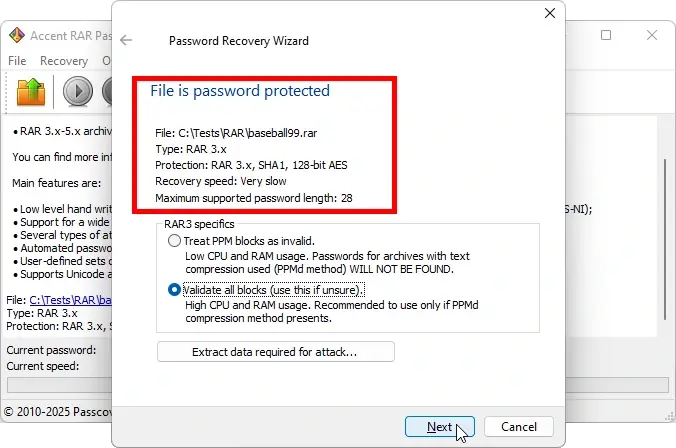
Our tools are optimized for high-speed CPU and GPU recovery and include three basic attacks (brute force, mask, dictionary) plus their extended versions: positional mask, dictionary merging and mutation; as well as attack scenarios for complex cases.
Passcovery Tools for Working with RAR
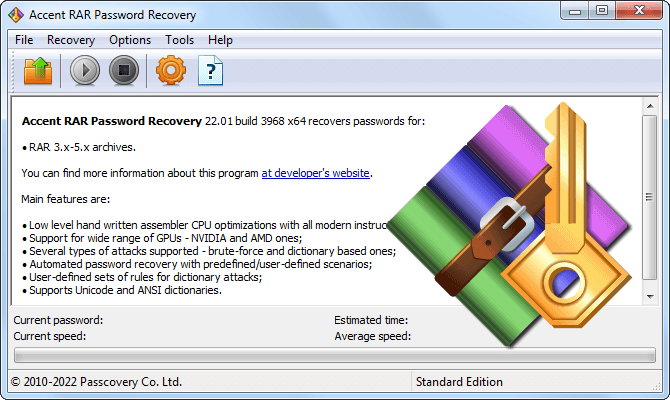
Accent RAR Password Recovery
for RAR3/RAR4/RAR5 archives (WinRAR 2.9–7.x)
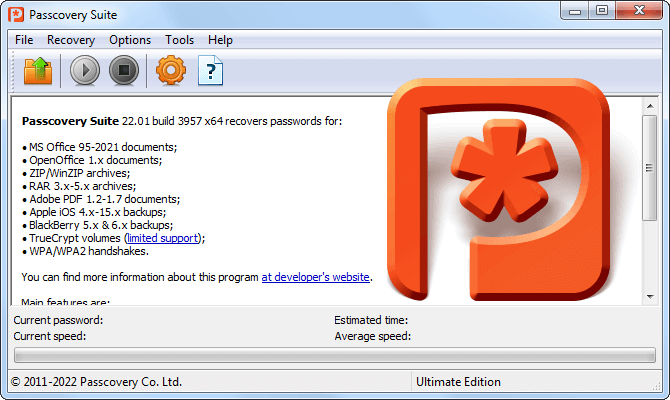
Passcovery Suite
for RAR and MS Office/OpenOffice, Adobe PDF, ZIP, Apple iOS backups, TrueCrypt, WPA/WPA2 handshakes
Engineering Details of KDF in RAR3/4
KDF converts the password to UTF-16LE (each ASCII character is doubled). The SHA-1 block is 64 bytes, 80 compression rounds. Number of sha1_block calls:
sha1_block_calls = 4096 × (2L + 11)
- 4 characters → 77,824 calls
- 28 characters → 274,432 calls
At lengths >28 characters, the internal block behaves differently: the KDF structure changes, the GPU kernel requires a rewrite, more registers are needed (warp occupancy drops), and larger buffers (memory bandwidth) become a bottleneck. Complexity and low efficiency limit the length to 28 characters.

Author: Denis Gladysh,
Co-owner and Head of Passcovery. Passcovery is a provider of high-speed
GPU-accelerated software solutions for recovering passwords for popular file formats. Denis is the author of the first versions of
Accent OFFICE Password Recovery, created in 1999.


Frequently Asked Questions About Password Recovery
Recovering a WinRAR password is a sequential process of testing candidates, since the RAR format uses strong encryption and there's no direct way to extract the password. For RAR3/RAR5 archives, the only technically viable approach is password enumeration by range or dictionaries.
The RAR format uses AES-256 encryption with no known vulnerabilities. Recovery tools don't "get the password directly"–they test possible candidates and check against the archive's verification data. The longer and more complex the password, the slower the search.
The modern approach to password recovery includes three main methods:
- brute force across a defined character range;
- mask attack, if you know anything about the password structure–for example, the first letter is uppercase or the password ends with numbers;
- dictionaries and dictionary mutations–testing the most probable combinations built from words, their variations, and character substitutions.
Practical approach: if the password is based on words or contains memorable elements, start with a dictionary attack with mutations–replacing letters with similar characters, adding numbers, changing case. If you have no information, use masks and limit character ranges to reduce the search space.
Tips for speeding up the search:
- use positional masks–define specific character ranges for different parts of the password;
- enable GPU acceleration (NVIDIA/AMD/Intel Arc)–this significantly increases recovery speed compared to CPU;
- merge dictionaries and apply mutations–create expanded lists of possible combinations.
It's important to understand the limitations: even with optimal methods and powerful hardware, a long and complex password with high entropy may be practically uncrackable within a reasonable timeframe. There are no "magic methods" (editing file bytes, hidden backdoors, hacker exploits) for RAR encryption.
If the password couldn't be found, try to recall any clues about its structure–length, words used, presence of numbers or special characters. These hints help build masks and custom dictionaries that significantly improve recovery chances.