
What Is Passcovery's Licensing Policy, and What Do You Get for Your License?
A Passcovery license works as an annual subscription. You pay once and get the program, every update, and tech support for a full year. When the year is up, the software keeps working on the same computer. You only pay again in two cases: for new versions, or if your computer's Hardware ID changes after the year has ended.
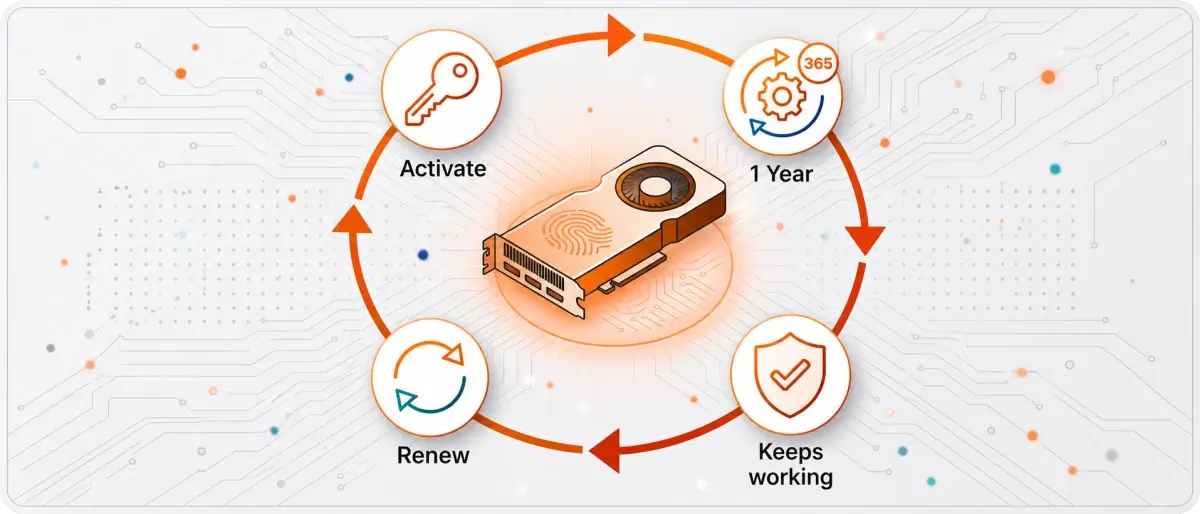
Here's the rundown: what's included in a license, how the annual subscription works, what renewal costs, and how refunds work. No legal fog — just plain English.
What's Included in a License
A Passcovery license gets you three things:
- The full program, with no trial limits: password recovery for the formats the product is built for.
- A year of updates: new versions and support for new hardware while your subscription is active.
- Priority support: we answer everyone, but license holders come first.
The free Trial is always available, too, so you can test the program before you buy.
The Annual Subscription: How It Works
The subscription runs for one year from your first activation. During that time the program keeps getting updates, and your questions go to the front of the line. When the year ends, the activated version doesn't shut off. Only new versions and support pause, and renewing brings both back.
The year starts at activation, not on the day you buy. There's no deadline for your first activation: you can buy a license now and activate it whenever you actually need the program.
Now, about the hardware lock. A license is tied to your Hardware ID (HWID), a kind of "fingerprint" of your computer. It's built from many system parameters, so swapping a graphics card or reinstalling the OS isn't the only thing that changes it. New hardware means a new HWID: the program loses its activation, but the license itself doesn't go anywhere.
From there, it all comes down to timing. Within the year, you handle reactivation yourself, just like after purchase (at no extra cost, of course). If the year has already passed, reactivation becomes available once you renew your license.
If the computer is offline, see our guide to offline activation.
Renewing a License: Price and Timing
Renewal costs 30% of your license's base price, and you can renew at any time, even years after your subscription ends. You get a new key, and the year starts over with the new key's first activation. Along with it come new versions, support, and the right to reactivate when your hardware changes.
In Plain Terms
You can park a license and wake it up years later. Buy it, use it, set it aside: the subscription hibernates like a bear in winter. The program just sits on your drive the whole time and never asks for a dime. Need it again three years later? Wake it up with a discounted renewal — no penalty for the long nap. You only pay for the years the program is actually working for you.
Passcovery's Five License Types
Passcovery offers five license types: Trial, Basic, Standard, Professional, and Ultimate. They differ in how many graphics cards (GPU devices) they can use and, in the simpler products, in whether the license is for personal or business use.
| License type | Compute devices | Who it's for | Usage |
|---|---|---|---|
| Trial | CPU and one GPU device | anyone | evaluation, free |
| Basic | CPU only | individuals only | non-commercial |
| Standard | CPU and one GPU device | individuals and businesses | commercial and non-commercial |
| Professional | CPU and two GPU devices | individuals and businesses | commercial and non-commercial |
| Ultimate | CPU and more than two GPU devices | individuals and businesses | commercial and non-commercial |
Here's the key thing about speed: on a single graphics card, it's the same for every license that uses a GPU, Trial included. That's why the Trial shows the real speed on your hardware before you buy.
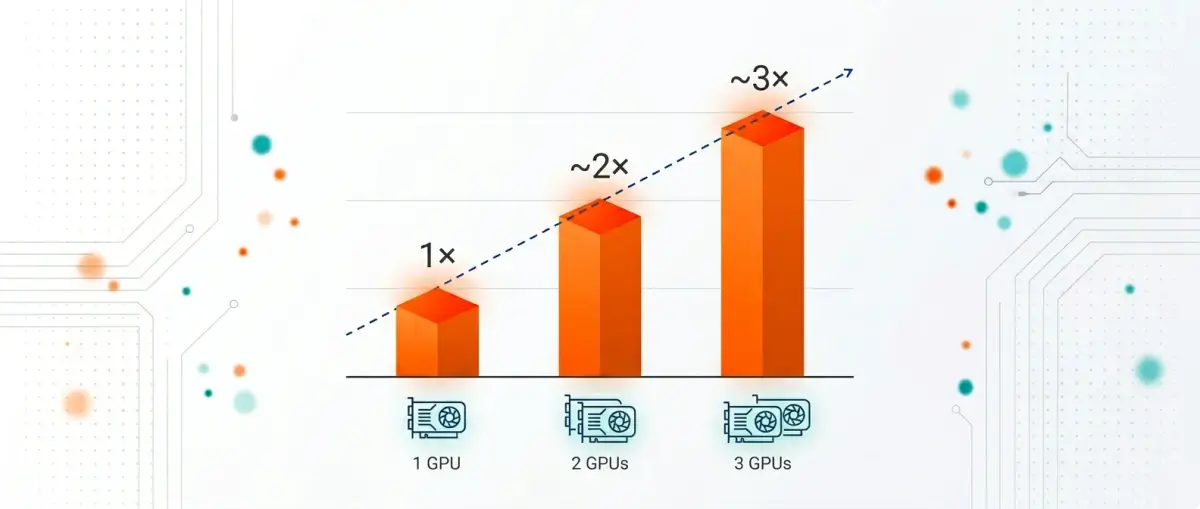
Standard works with one graphics card, just like the Trial. Professional and Ultimate use two or more: each card checks its own share of passwords, so two cards cut the search time roughly in half, and three cut it to a third. That's how parallel GPU computing works: the job splits into independent chunks, and the speed gain is close to linear.
Ready to choose? Pick the license that fits your product and graphics cards.
Can You Get a Refund If the Program Didn't Help?
If the activated program fails because of an issue on our end, we'll fix the problem or refund your money: we review every request within seven days. There's no unconditional refund after activation, so you start by testing the program free in the Trial on your own file. That way, buying is a deliberate choice, not a gamble. The full terms are in the license agreement.
Expert tip from Denis Gladysh, Head of Passcovery:
Don't buy blind. Download the free Trial and put it through its paces. Run a recovery on the actual file, play with the range and the mask, or better yet, create a test file with a password you already know and make sure the program finds it. You'll see how long a search will take on your graphics card and how the program works. Our rule is simple: test first, license second.
A Professional Tool at an Affordable Price
Passcovery is a professional-grade GPU tool that anyone can afford. It doesn't need expensive specialized hardware or a big lab budget: it runs on ordinary GeForce, Radeon, and Intel Arc cards already sitting in your computer, and squeezes more out of them. That's why individuals and companies alike buy it without a second thought.
You can buy a license ahead of time and activate it whenever you need it — the year only starts with your first activation. Place your order today, or if you're on the fence, start with the free Trial and test the program on your own file.
About the Author

Denis Gladysh, co-owner and head of Passcovery, a maker of high-speed, GPU-accelerated password recovery software for popular file formats. Denis wrote the first versions of Accent OFFICE Password Recovery back in 1999.


Frequently Asked Questions About Licensing and Password Recovery
Is It Legal to Use Password Recovery Software?
Recovering passwords is legal as long as you have the right to access the data. Typical legitimate cases: you're opening your own file after forgetting the password, a company is regaining access to a document left behind by a former employee, or a specialist is conducting a forensic examination.
The principle is simple: you recover what you're already entitled to open. Accessing someone else's data without permission is illegal and has nothing to do with what Passcovery is for.
How Long Does It Take to Recover a Password?
Recovery time depends on the file format and how complex the password is, so the range is huge. Passcovery tests a classic ZIP at billions of passwords per second and often opens almost instantly. RAR is tougher: the rate drops to tens of thousands per second, and a strong password can take days.
We won't guess at a timeline. Run the free Trial on your own file: it shows the real speed on your hardware, so you can judge your odds of finishing in a reasonable time.
What File Formats Can Passcovery Recover Passwords For?
Passcovery recovers passwords for Office and OpenOffice/LibreOffice docs, PDFs, RAR and ZIP archives, iOS backups, TrueCrypt volumes, and WPA/WPA2 handshakes. The all-in-one Passcovery Suite covers the whole set, Microsoft 365 files included.
If you only need one format, the Accent Password Recovery line has dedicated apps for Office, PDF, RAR, and ZIP. They cost less because they work with a single format.
Which GPUs Are Supported, and Can I Use More Than One?
Passcovery supports NVIDIA, AMD, and Intel Arc GPUs, and ordinary gaming cards work fine. Multiple cards work together: the search is split among them, and speed grows almost in proportion to the number of cards.
How many cards it uses depends on your license type: Basic uses none, Trial and Standard use one, Professional two, and Ultimate more than two. To pick a model, check our GPU rating for password recovery.
How Many Computers Can I Use One License On?
One license works on one computer: it's tied to the Hardware ID of the machine where you activated the program.
Need to work on several PCs at once? Get as many licenses as you have machines. And if you move to a new computer within a year of your first activation, you'll reactivate the program yourself at no extra cost.