
AccessBack.com Decrypts the Whole Excel/Word 97-2003 Document: the Screenshot Proves It, the File Follows Payment
The screenshot captures a random fragment of your document: AccessBack.com doesn't cut the file up — it shows you that the protection is already off and the data reads fine. That's the whole job of that snapshot. For how it all works step by step, from a password-locked file to a decrypted copy, watch the video below and check the FAQ section on AccessBack.com.
Every stage of working with the service: from uploading the locked file to receiving the decrypted version
The Screenshot Shows That the Document Opened, Not That Only Part of It Was Decrypted
AccessBack.com takes the snapshot from an already-open document, at a random spot: you can't pick which part of the data lands in the frame. That's where the feeling of getting a scrap comes from. In reality, the service doesn't work with fragments at all. The file is decrypted in full, and the snapshot is taken from the finished result.
The snapshot has exactly one job: to show that the document opens again and looks like the original. Access to your Excel or Word file is restored, the protection is gone, and the tables and formatting are right where they were. Decryption doesn't rewrite anything or flatten the document into plain text — the structure stays exactly as it was before the file got locked.
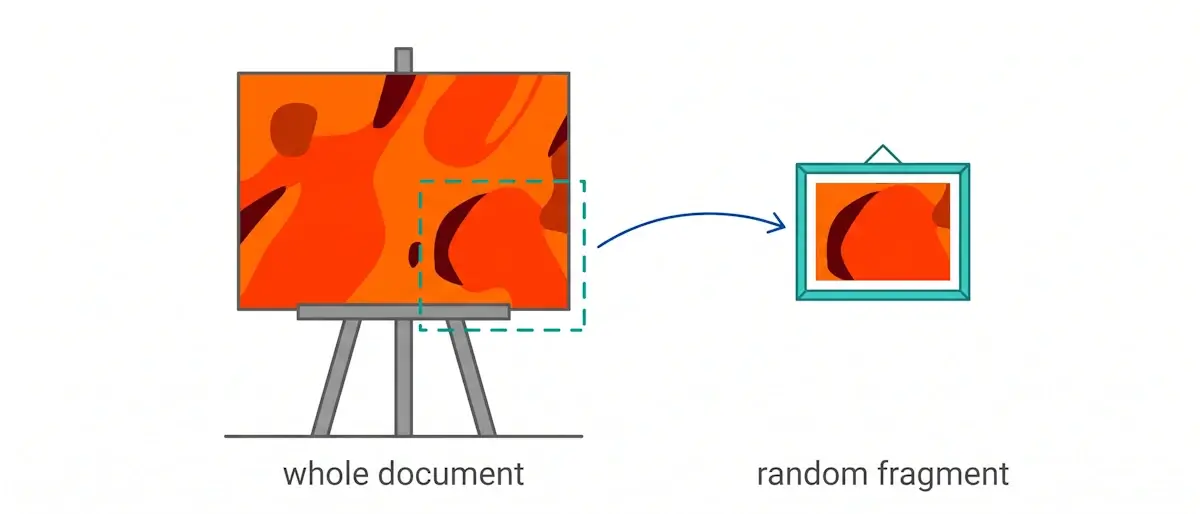
A restorer strips the darkened varnish off a painting and sends you a photo of a random corner of the canvas. Not because only the corner got cleaned. The photo proves it: the layer is off, the colors underneath are alive, and the whole painting is waiting for you at the studio.
AccessBack.com Returns the Same xls or doc File, Not a Data Export
The decrypted document keeps its format: xls stays xls, doc stays doc. This isn't a file rebuilt from scratch or your content dumped into some other document — it's a copy of the original with all the sheets, pages, records, and formatting it had. Formulas, styles, merged cells, and any complex formatting stay untouched: decryption removes the encryption, it doesn't remake the document.
The Only Difference: the File No Longer Asks for a Password
Open the document you get back in Excel or Word, and it opens right away. No password prompt, because the data in the file is no longer encrypted: the open password is off it. In every other respect, it's the same document you had.
Working With the Service Takes Five Steps, Payment Comes Fourth
The order is simple, and the video above walks through the whole thing:
- Pick the file — an Excel or Word document with a forgotten open password, in xls or doc format.
- Upload it to AccessBack.com. The service identifies the protection type, finds the encryption key via rainbow tables, and decrypts the document.
- Wait for the screenshot. The snapshot confirms that the protection is off and the data is all there.
- Pay for the decryption — if you're satisfied with the result and you do need the file.
- Get your document without password protection, in its original format and with all its data.
The first three steps are free: uploading the file, finding the key, and the decryption itself cost you nothing. You make the decision to pay only after you've seen the result on the screenshot.
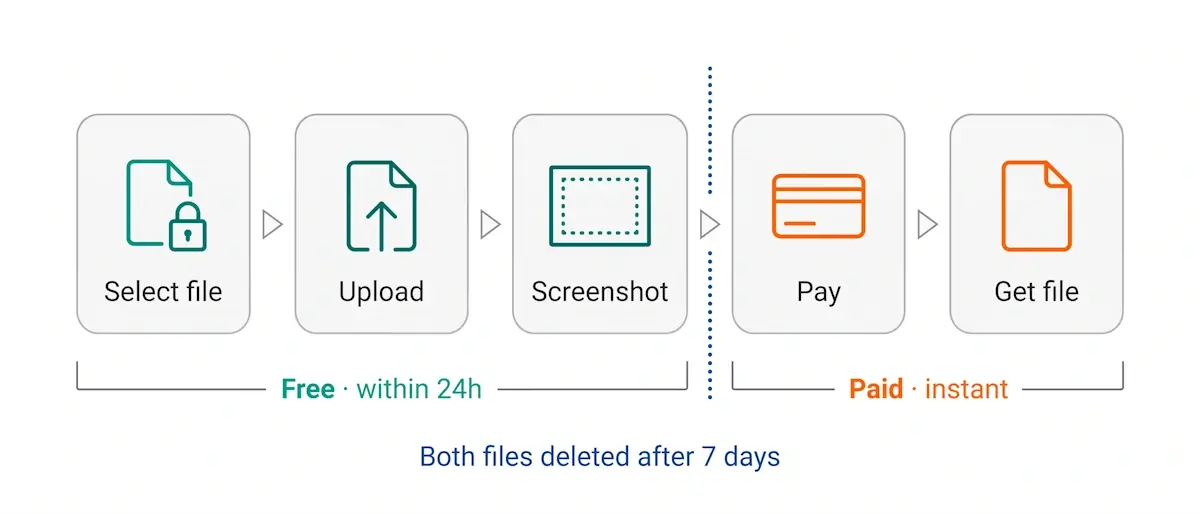
The Free Screenshot Arrives Within 24 Hours, Guaranteed, Usually Much Sooner
Decryption itself takes a few minutes. But requests are handled in order, and during busy hours the wait stretches out, so the guaranteed window for sending the screenshot is 24 hours. In practice the snapshot shows up noticeably earlier, often within half an hour.
The Service Runs the Decryption at Its Own Cost, You Pay Only for File Delivery
Your Excel or Word document gets decrypted for free. Not a trial, not a preview, not half the job: the encryption key is found, the protection is off, the document is ready to hand over. That's exactly what the screenshot confirms. The computing power spent finding the key through rainbow tables has already been burned, and nobody is going to bill you for it — the service covers that cost.
From there, it's your call. If the data on the screenshot isn't what you needed, or the file no longer matters: close the page, there's nothing to pay and nobody will ask you for anything. If you do need the document: pay for delivery and take your decrypted copy without password protection — it goes out to you as soon as the order is processed. Pricing comes in packages, from one file to ten, and the more files in the package, the cheaper each one works out.
Both Files Are Deleted From the Server After 7 Days
After a week the server is wiped: both the decrypted copy and the original encrypted document you uploaded are deleted. None of your data stays with the service. If you didn't manage to pay within that window, you'll have to upload the file and run the decryption again.
The Service Works Only With Excel/Word 97-2003: xls and doc Files With a 40-bit Encryption Key
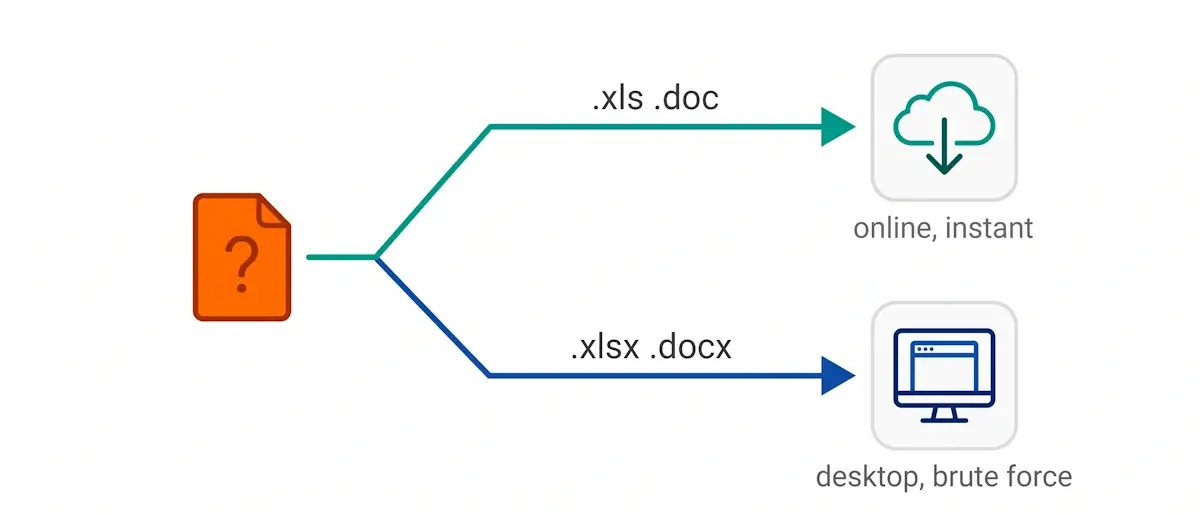
AccessBack.com decrypts Microsoft Excel and Word documents in the 97-2003 format and takes the open password off them. Those are files with the xls and doc extensions, protected by a 40-bit encryption key. The service doesn't take any other formats, so check your file's extension before uploading.
Rainbow Tables Find the Encryption Key, Not the Password Itself
The service doesn't crack or recover your password. It looks for the key your data is encrypted with, and those are two different things. A password turns into a key through a one-way transformation: going from password to key is easy, but there's no road back from key to password. The key it finds is enough to decrypt the document, but you can't reconstruct the original passphrase from it.
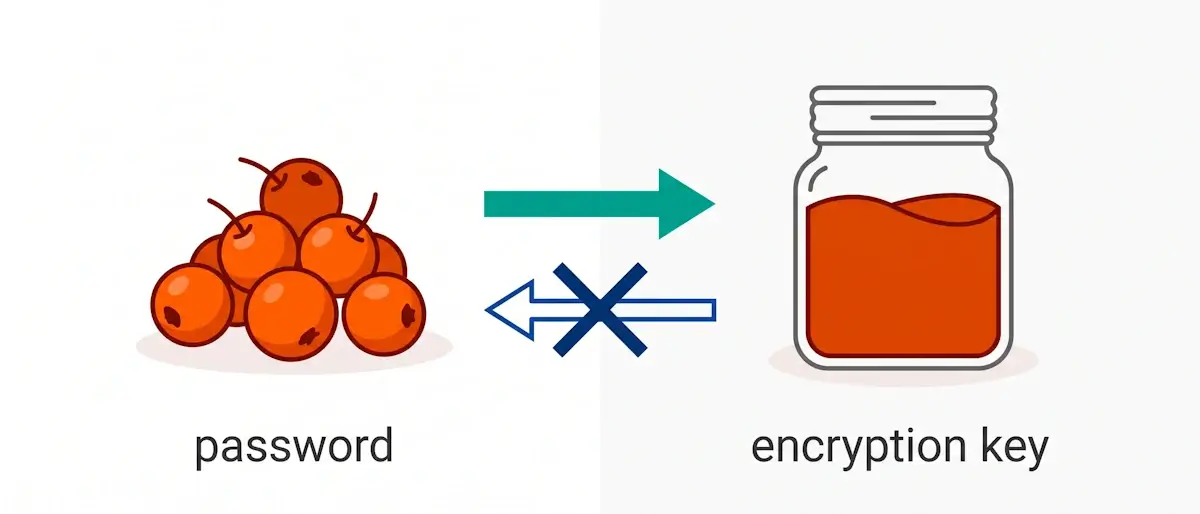
Berries cook down into jam in an hour. But you can't get the berries back out of the jam. It's exactly the same with a password and a key: the key it finds is enough to decrypt the document, but there's no getting the original password-berry back out of that key-jam.
The search runs on Passcovery's rainbow tables. The same tables power the desktop program Passcovery Suite, so what's behind the online service isn't some homemade script but a method the company has been developing since 2008.
The same method works on the desktop. Passcovery Suite uses those very rainbow tables, just locally, on your own computer. Here's what it looks like in the program:
What AccessBack.com Does Not Do
So there are no false expectations, here are three things the service doesn't take on:
- It doesn't send you the document's original password. What gets found is the encryption key, not the password. If it's the passphrase you need, that's recovered by search in a separate program.
- It doesn't work with modern Office formats. Only 97-2003, only xls and doc, only a 40-bit key. The service won't take xlsx and docx files: those use strong encryption, and guaranteed table-based decryption doesn't exist for it.
- It doesn't change the document's contents. Nothing is edited — not the data, not the formulas, not the formatting: what arrives is an exact copy of the original file with the protection stripped off.
The first two cases are covered by the desktop Accent OFFICE Password Recovery: it searches for the password itself and supports every version of Microsoft Office, from 2.0 to 2024 (including Microsoft 365). The price of that versatility is the familiar one: a search comes with no guarantee and can drag on for a long time.
In Short: a Free Screenshot First, the Paid File Second
AccessBack.com takes the open password off Excel and Word 97-2003 documents and sends you a screenshot of a random fragment: proof that the protection is off and the data reads fine. The key to the 40-bit encryption is found through Passcovery's rainbow tables, the xls or doc file is decrypted in full, and the formatting stays untouched. Not a cent up to that point: the service runs the decryption at its own expense. From there it's your call: if you need the file, you pay for delivery and get an exact copy with no password protection; if you don't, you just close the page and owe nobody anything.
About the Author

Denis Gladysh, co-owner and head of Passcovery, a maker of high-speed, GPU-accelerated password recovery software for popular file formats. Denis wrote the first versions of Accent OFFICE Password Recovery back in 1999.


