
Choosing the Right GPU for Password Recovery
GPU password recovery exponentially speeds up brute-force attacks. It works through parallel computing: your graphics card crunches thousands of passwords simultaneously, rather than processing them one by one.
But which graphics card should you choose? What specs actually matter? What constraints are hidden within the password-protected files themselves, and when does GPU acceleration actually kick in?
I’m Denis, co-founder of Passcovery. Let's cut to the chase and get you some practical answers. Let's dive in.

Why GPUs Crack Passwords Faster Than CPUs
Graphics cards beat processors purely on core count. A password attack boils down to checking millions of combinations, one after another. For each guess, the software derives the key and attempts to decrypt the file. Rinse and repeat until the correct password is found.
Split this workload into parallel threads, and your cracking time drops exponentially. Brute-forcing is the ultimate workload for GPUs, where thousands of compute cores crunch data simultaneously.
GPU cores are essentially "dumber" than CPU cores, but they make up for it in sheer volume. Think of it like harvesting a berry field. The master agronomist (the CPU) knows everything about soil science, but picks berries slowly. A hundred basic farmhands (GPU cores) only know how to "pick and drop", but the entire field is cleared while the agronomist is still on the first row. Password cracking works exactly like this: a massive swarm of basic calculators wins every time.
This is why, in practice, a budget graphics card outperforms a top-tier processor. This isn't theoretical; it's backed by our GPU benchmark data. Let's look at a heavy format like RAR5:
- A Radeon RX 6400 (around $300) pushes 16,000–19,000 passwords per second (p/s).
- Flagship processors like the Core Ultra 7 270K Plus and Ryzen 9 9950X3D barely hit 7,300–7,800 p/s.
- An Intel Arc B570 (around $260-$290) accelerates up to 63,000–69,000 p/s.
An entry-level AMD card is already twice as fast as flagship CPUs, and the Intel Arc crushes them by a factor of almost 9x—and both are significantly cheaper. This leads to one ironclad rule: always offload password cracking to the GPU.
It’s simply faster.
Passcovery GPU Benchmarks: What Drives Cracking Speed
Our Passcovery benchmarks track two key metrics for every GPU: raw cracking speed and performance-per-dollar. We calculate and verify both metrics in our NVIDIA, AMD, and Intel Arc GPU benchmark ratings using Microsoft Office and RAR5 files. We highly recommend using these charts as your starting point.
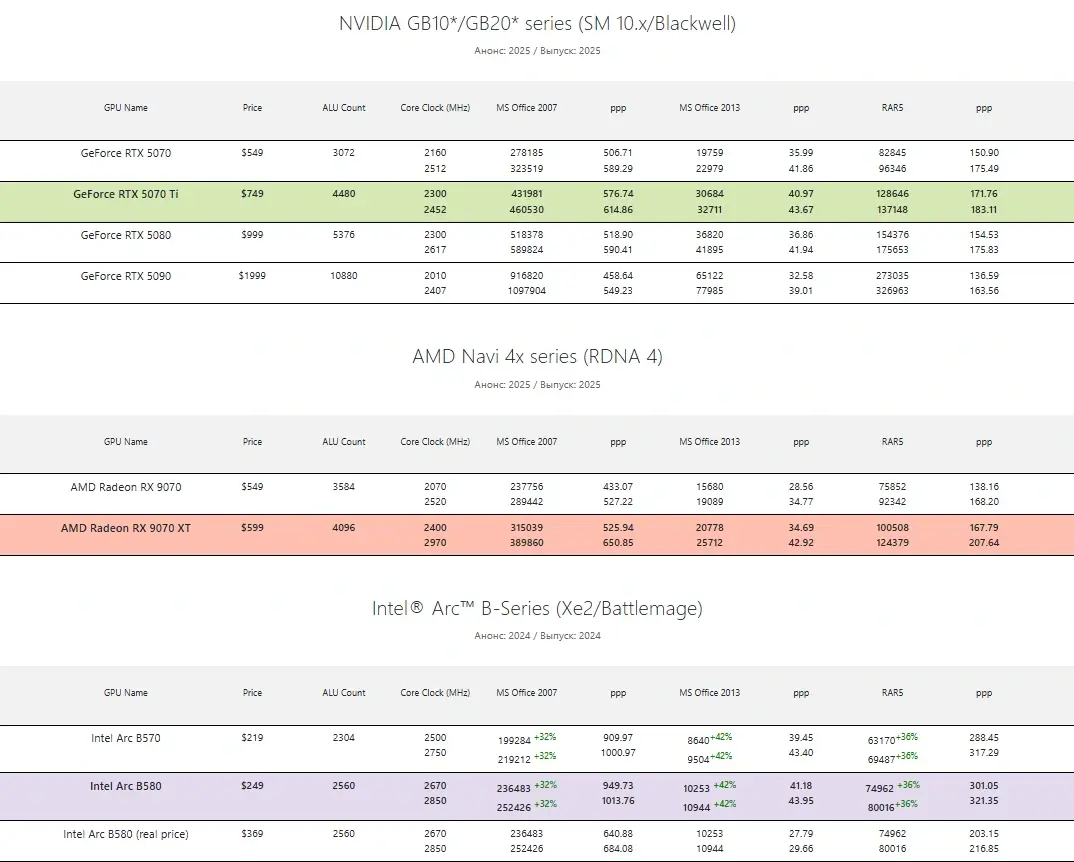
Why just a "starting point"? Because your final choice shouldn't be dictated by raw speed alone. You also have to factor in TDP (Thermal Design Power / power consumption) and hardware pricing.
Power Efficiency: Current TDPs and 24/7 Loads
A well-optimized cracking tool maxes out your GPU at 100% in a 24/7 environment—breaking strong encryption can take days. This generates a few logistical headaches:
- Massive heat output: requires robust (and ideally supplemental) cooling;
- Loud fan noise: you'll likely want a soundproofed PC case;
- High power draw during 24/7 operation: this translates directly into higher energy bills.
Once upon a time, the NVIDIA Maxwell architecture was the undisputed king of efficiency: fast and running completely cool (we still fondly remember the GeForce GTX 750 Ti and its paltry 60W power draw). Several GPU generations have passed since then, and those glory days are long gone.
Today, entry-level consumer cards (like the GeForce RTX 5060) start at 170W, and mid-range cards pull even more. As a baseline for real-world load consumption (as of September 2026): an RTX 5070 Ti pulls about 270-315W, while the RX 9070 XT sits at 309-345W. However, the Intel Arc B580 sips a much more modest 160-197W (which is confirmed by TechPowerUp benchmarks).
Lower wattage means less money spent on cooling and a friendlier power bill. But the ultimate metric is this: how many passwords per second are you squeezing out of every watt and dollar? The performance-per-dollar ratio is laid out in our benchmarks, while you'll need to calculate wattage against your local utility rates.
Price vs. Performance: Why Flagships and Pro GPUs Aren't Worth It
Enterprise and workstation GPUs offer terrible ROI for password cracking. People frequently ask us: how much faster will my rig be with an NVIDIA A100, H100, or AMD Instinct? Our answer: about minus tens of thousands of dollars.
On paper, if you calculate raw compute power (cores multiplied by clock speed), the H100 is an absolute monster. But a standard consumer GeForce RTX 5090 is right on its heels in these specific metrics, while costing 8 to 12 times less (an H100 runs $17,000-$25,000+ per unit; an RTX 5090 is around $2,000).
You aren't paying for raw silicon; you're paying for performance-per-dollar. By that metric, datacenter giants lose to consumer flagships every single time. Password cracking relies entirely on integer ALU operations. As NVIDIA's official documentation points out, those incredibly expensive Tensor cores are purpose-built for AI matrix math, and ECC memory is designed for server uptime. In password recovery, all that premium datacenter tech just sits idle. You're paying a massive premium for zero benefit.
The sweet spot (for price and performance) is the mid-range of the current generation, or the top-tier of the previous generation once prices drop. This rule applies across the board: NVIDIA, AMD, and Intel.
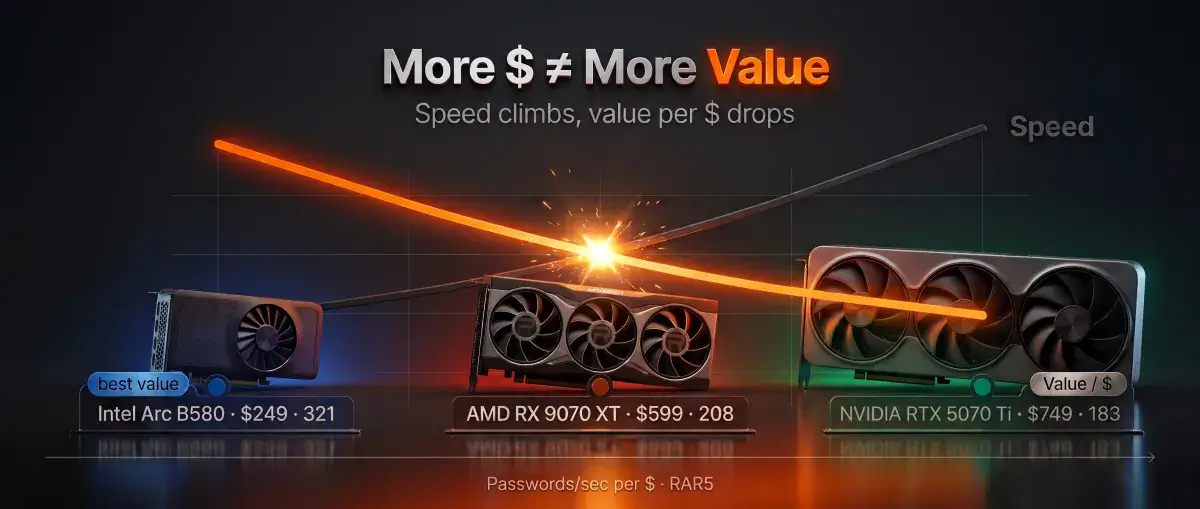
For RAR5, an RTX 5070 delivers about 175 passwords per second per dollar, while the flagship RTX 5090 only gives you 164. The card is triple the price, but yields less return on investment. That specific column in our benchmark table is a great reality check.
Of course, sometimes the budget is infinite: you have a tight deadline, a critical file, and you just need absolute peak speed. In that case, there's only one choice—the top of the charts, which is currently the NVIDIA GeForce RTX 5090. It's an expensive, power-hungry beast (10,880 CUDA cores, hitting up to 326,963 p/s on RAR5), but for raw, uncompromised speed, it currently has no equal.
Flagships are justified strictly for raw speed. For everything else, the mid-range is the smarter buy.
Two Bottlenecks in GPU Cracking
GPUs massively accelerate cracking, but this acceleration hits two hard limits. These aren't hardware flaws; they are tied directly to how the cryptography works.
Limit 1: Not Every Attack Can Be Accelerated
For classic Zip archives (ZipCrypto), GPU acceleration only works on pure brute-force attacks, where the software tests every combination blindly. The moment you apply an extended mask, mask the last character, or run a dictionary attack, GPU acceleration drops off entirely, and the CPU takes over the workload (read more on CPU load during Zip cracking). This is a structural quirk of the format, regardless of which graphics card you own.
But that doesn't mean masks and dictionaries are useless. On the contrary, they are the most powerful techniques for cracking strong passwords (I demonstrated this in a live archive cracking example). They intelligently prune dead-end guesses:
- Positional masks drastically shrink the search space by thousands of times (mask examples).
- Merging up to four dictionaries with mutation rules catches passwords built from real human logic and phrases (dictionary examples).
Just keep this in mind: on classic Zip files, smart attacks run through the CPU, while brute-force runs through the GPU.
Historically, NVIDIA GPUs choked on Zip archives with classic encryption. But in September 2020, we changed the game: we optimized the clock synchronization between the CPU and GPU, boosting NVIDIA cracking speeds for these archives by 5 to 8 times. Back then, a GeForce GTX 1060 jumped from 669 million to 3.4 billion passwords per second (read the technical breakdown here).
Limit 2: The CPU Bottleneck
The final validation of every password guess is always done by the CPU, not the graphics card. The GPU needs its partner. The processor is responsible for unpacking the archive and verifying the checksum; the graphics card merely preps the "raw material"—the keys.
This can create a severe bottleneck. If you pair a monster GPU with a weak CPU, the graphics card generates keys faster than the processor can verify them. The graphics card ends up sitting idle, and the software looks like it's stalling (read about CPU/GPU balance here). You'll typically see this issue crop up in three formats:
- Large RAR3 archives, especially those created without compression (Store method);
- Zip files with classic encryption;
- OpenOffice documents.
The golden rule: there is no point in pairing a top-tier GPU with a low-end processor for these formats. Your rig needs to be balanced. RAR3 also has an added quirk regarding password length: cracking hits a hard wall at 28 characters due to the KDF algorithm (a specialized function designed to intentionally slow down key generation) (here's why that happens).
Cracking Speeds by Format: The Summary Table
Password cracking speed is directly tied to the format's cryptographic strength. To make this clear, I've consolidated our real-world benchmarks into a single table.
This covers all formats supported by Passcovery Suite. The table shows the baseline security of the algorithms and the real-world speeds across three balanced mid-range GPUs from Team Green (NVIDIA), Team Red (AMD), and Team Blue (Intel).
| Format | Security Level | NVIDIA GeForce RTX 5070 Ti | AMD Radeon RX 9070 XT | Intel® Arc™ B580 Graphics | Hardware Bottleneck |
|---|---|---|---|---|---|
| ZIP, classic encryption | Very Weak | 25.9 Billion | 28.3 Billion | 17.0 Billion | CPU Balance |
| Adobe PDF, legacy (Acrobat 5-8, RC4) | Very Weak | 87.1 Million | 95.3 Million | 57.7 Million | GPU |
| ZIP, WinZip AES | Weak | 11.0 Million | 12.2 Million | 7.2 Million | GPU |
| WPA/WPA2 (Handshakes) | Medium | 1.30 Million | 1.43 Million | 855k | GPU |
| Microsoft Office 2007-2010 | Medium | 536k | 587k | 352k | GPU |
| TrueCrypt (RIPEMD-160) | Strong | 334k | 365k | 219k | GPU |
| RAR3 | Strong | 219k | 240k | 144k | CPU Balance; 28-char limit |
| RAR5 | Very Strong | 126k | 138k | 82.7k | GPU (Scales linearly) |
| Microsoft Office 2013-365 | Very Strong | 40.4k | 44.2k | 26.5k | GPU |
| Speeds (passwords per second) were recorded using the Passcovery Suite Benchmark Tool. Your local numbers may vary based on your CPU, cooling, drivers, and background tasks. The exact numbers aren't as important as the order of magnitude and the speed differences between formats. | |||||
To recap: any modern graphics card is capable of password recovery. It all comes down to your final performance-per-dollar ratio (check the Passcovery GPU rankings). The table above highlights our current favorites in the mid-range sweet spot.
Format Quirks and Exceptions
The summary table only lists speeds for formats that support hardware acceleration. We've only included algorithms that can be efficiently parallelized on a GPU. But there are a few important caveats.
Modern Adobe PDF formats (Acrobat X and newer) are strictly CPU-only. These documents use robust AES encryption that is tightly coupled to CPU architecture. GPU acceleration is technically impossible here, so a high-end graphics card won't help you (read the deep dive on why).
Office 2010 encryption takes twice as long to crack as 2007, yet they share the same row. The reason is simple: Microsoft doubled the hashing operations for the 2010 release. However, when compared to the absolute brick wall of Office 2013-365 (where speeds plummet dramatically), both older versions crack relatively fast. That's why we grouped them together under "Medium" difficulty.
VRAM and Multi-GPU Setups: What Actually Matters
VRAM: Doesn't Matter at All
Video RAM capacity has absolutely zero impact on password recovery speed. This is a massive misconception that causes people to throw money down the drain when building a cracking rig. It feels intuitive: bigger gigabyte numbers on the box should equal faster cracking. But it doesn't.
Password cracking algorithms only use a few megabytes of memory. Every other gigabyte of VRAM just sits there doing nothing (read our piece on VRAM impact). Your final speed is dictated exclusively by core count and clock speed. Paying a premium for extra VRAM for password cracking is literally throwing money away.
Multi-GPU: Speed Scales Linearly
Dropping multiple graphics cards into a system provides near-linear performance scaling. Two cards will process passwords twice as fast; three will triple your speed. Your only real limitations are physical: you need enough PCIe slots on your motherboard and enough wattage from your PSU.
Passcovery software automatically detects all installed GPUs and lets you toggle which ones to deploy. You can seamlessly mix and match vendors on a single Windows machine because we utilize open compute standards (CUDA for NVIDIA, OpenCL for AMD and Intel). This means your NVIDIA, AMD, and Intel Arc cards can all happily crunch the same file at the same time.
A quick reminder: Linear scaling from a second GPU only works if you aren't CPU-bottlenecked. As mentioned earlier, on formats like RAR3, classic Zip, or OpenOffice, your CPU can become the weak link. If the processor can't keep up with verifying the keys generated by your first graphics card, adding a second one won't give you a single extra drop of performance. If you want to scale up with multiple GPUs, make sure you have a high-end CPU to back them up.
Graphics cards don't guarantee instant results, but they radically accelerate the process. For files protected by strong cryptography, a GPU is your only realistic shot at cracking the password in a reasonable timeframe. If your rig has a GPU, you need to be using it. Period.
How to Benchmark Your Own Hardware
The built-in Passcovery Suite benchmark will show you exact cracking speeds on your specific hardware. Stop guessing how your current GPU or CPU will perform—just run the numbers.
The Passcovery Suite demo includes a fully unlocked benchmarking utility (Tools -> Benchmark) with no speed restrictions. Just download and install the software, run the test, and see exactly how many passwords per second your rig can push across different formats.
You can then easily cross-reference your results with our GPU benchmarks. This gives you a brutally pragmatic answer: either your current rig can handle the job, or it's time for a hardware upgrade.
About Passcovery
Passcovery specializes in high-speed GPU password recovery. We've been writing this code since 2008, focusing exclusively on deep hardware acceleration integration for NVIDIA, AMD, and Intel Arc architectures.
We deliver highly optimized algorithms and compute efficiency to maximize your password recovery speeds. Choose our all-in-one suite for maximum format coverage, or grab a targeted standalone tool for your specific file type.
The All-in-One Solution:
- Passcovery Suite: Supports all formats out of the box (Microsoft Office/365, OpenOffice/LibreOffice, Adobe PDF, Zip, RAR, iOS and BlackBerry backups, TrueCrypt, and WPA/WPA2).
Targeted Standalone Tools:
- Accent OFFICE Password Recovery: For Microsoft Office/Microsoft 365 and OpenOffice/LibreOffice files.
- Accent PDF Password Recovery: For Adobe PDF documents.
- Accent RAR Password Recovery: For RAR3 and RAR5 archives.
- Accent ZIP Password Recovery: For classic Zip and WinZip AES encrypted archives.
Instant Cloud Service:
- AccessBack.com: Guaranteed online decryption for Excel and Word documents utilizing legacy 40-bit encryption (.doc/.xls saved in Word/Excel 97-2003 compatibility mode).
About the Author

Denis Gladysh, Co-founder & CEO of Passcovery — a provider of high-speed, GPU-accelerated password recovery software solutions for popular file formats. He is the original author behind the earliest versions of Accent OFFICE Password Recovery, released back in 1999.


Frequently Asked Questions on GPUs and Password Attacks
What are the different types of password attacks, and which ones use the GPU?
There are three primary attack vectors: Brute-Force, Mask, and Dictionary. For most modern file formats, graphics cards will hardware-accelerate all three of these methods.
Your choice of attack depends on what you remember about the lost password:
- Brute-Force: A blind, exhaustive search of all possible combinations. Used when you know absolutely nothing about the password.
- Positional Mask: Shrinks the search space if you know structural details (e.g., total length or the exact position of numbers).
- Dictionary Attack: Tests real words, phrases, and mutation rules. Highly effective since humans tend to create predictable passwords.
The single exception is classic Zip encryption. Due to how the algorithm is built, the GPU can only accelerate pure brute-force attacks. Masks and dictionaries for classic Zip archives are processed entirely on the CPU (read the deep dive on the mechanics here).
Does a CPU with hardware AES (AES-NI) speed up password cracking?
In practice, AES-NI instructions don't provide a noticeable speed boost. The actual AES decryption represents such a tiny fraction of the total mathematical workload that hardware accelerating it is practically meaningless for brute-forcing.
Do not buy a CPU specifically for AES-NI if your goal is password cracking. The only format where this tech makes a real difference is legacy Adobe PDF /R6 (Acrobat X-XI) documents.
For all other formats, CPU cracking speed relies on entirely different instruction sets: SSE2, AVX, or AVX2. But the pragmatic rule of thumb remains: if an algorithm maps well to SSE2 instructions, it can be ported to the GPU. And once it's on the GPU, speeds jump to a completely different stratus (more on AES-NI and cracking speeds).