We use cookies. By continuing to use the site, you agree to their use.

Accent WORD Password Recovery, 25.04

Recover and remove passwords for Microsoft Word 6-2024 and Microsoft 365

AccentWPR instantly removes Password to Modify, Restrict Editing, and VBA Project passwords, and recovers the Password to Open at high speed for .doc/.docx files of all versions of Microsoft Word.
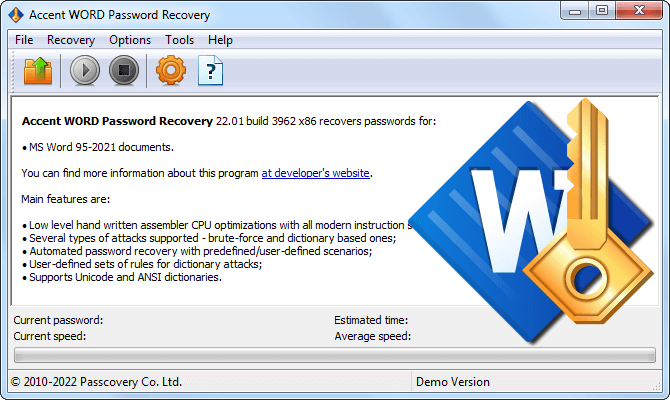
Accent WORD Password Recovery recovers and unlocks Microsoft Word passwords

Password Recovery with Accent WORD Password Recovery

Supported File Formats

Accent WORD Password Recovery supports all versions of Microsoft Word. The program quickly recovers a password to open and instantly finds or removes all other types of passwords.

AccentWPR for Microsoft Word Passwords

Instant Recovery/Removal of Passwords

Accent WORD Password Recovery instantly recovers (or removes) permissions passwords for all versions of Microsoft Word:

  • Password to Modify
  • Editing restrictions password (Restrict Editing)
  • VBA Project Password
AccentWPR instantly removes weak encryption passwords

High speed of brute forcing a Password to Open

Recovering a Password to Open a document is actually carried out by running the brute force attack for a set range of possible passwords. Accent WORD Password Recovery enables maximum speed performance and guarantees fast recovery of lost Word passwords on any modern CPU Intel or AMD.

For Microsoft Word 2007-2024 files, recovery speed can be significantly increased with NVIDIA, AMD, or Intel GPUs. GPU acceleration is available in another Passcovery product – Accent OFFICE Password Recovery.

AccentWPR squeezes maximum out of each CPU core

Brute Force with Extended (Positional) Mask Attack

One of the conditions for successful recovery of Word passwords is high speed of brute force attack. Another one is the range customization options that allow to further reduce the search time by cutting down on the number passwords to try.

Accent WORD Password Recovery enables support for brute force attack (direct search) with an extended (positional) mask. Such a mask allows to configure characters sets individually for each position of the generated password and try only those passwords that meet the criteria defined by the mask.
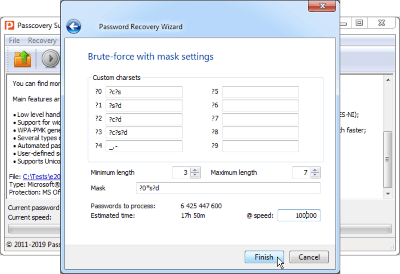
See a few examples of how to use it

Extended (positional) mask in AccentWPR

Mutation and Blending of Dictionaries

Accent WORD Password Recovery offers advanced dictionary attack.

The program is able to operate with four dictionaries at once, combine them together and modify the resulting passwords according to the defined password mutation rules. The rules are described by the user with the help of built-in "Rules Editor". A preview window allows you to see the changes before you save them.
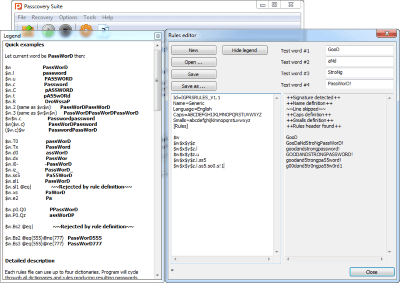
See the video illustrating such mutations

Dictionary Attack with Mutations in AccentWPR

Configurable Attack Scenarios

To further increase efficiency of Word password recovery, Accent WORD Password Recovery enables the user to run attack scenarios. While configuring a scenario, you can describe a series of attacks with individual settings of each, and the program will run the attacks one by one until it finds the lost Word password.

The scenarios are described in the form of text files. You can define scenarios of various complexity and enable one at the stage of selecting a password attack.
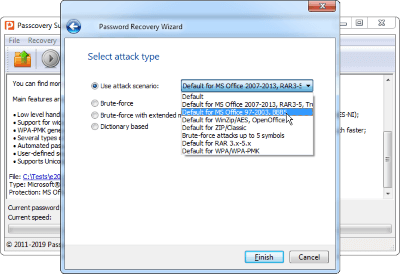
Password attack scenarios in Accent WORD Password Recovery

All Features of AccentWPR

  • Supporting Microsoft Word formats ()
  • Immediately removes simple protection passwords
  • Fast searching of Password to Open on CPU
  • Three types of attacks: brute force attack, extended mask attack, dictionary attack
  • Supporting multilingual Unicode, UTF-8 and ANSI dictionaries used in dictionary attack
  • Expert-level range customization options
  • Auto-saving of an attack status which allows to resume a saved attack session
  • Fully offline processing: your data never leaves your computer
  • Classic Windows GUI, command-line interface
  • Unified interface across all Passcovery products
  • Interface localized into eight languages
  • Full Windows 10/11 compatibility (works with 7/8)
  • Well-balanced pricing policy

AccentWPR demo version

Accent WORD Password Recovery is a safe commercial product from Passcovery, a company with 18 years of experience in password recovery. The free demo version lets you test all of the program's features.

Download Accent WORD Password Recovery

version 25.04 for Windows x86; .msi-installer (digitally signed by Passcovery Co. Ltd.), size 7532 Kb

Limitations of a demo version

  • displays only the first two symbols of the found password
  • one attack runs maximum 30 minutes
  • no saving of attack sessions

To remove limitations of a demo version, buy a license and activate your copy of the software product.

Accent WORD Password Recovery Licenses

Home License Business License
Supporting Microsoft Word 6-2024 yes yes
1 year of free updates yes yes
Free technical support yes yes
Internal corporate use no yes
Single PC License 40 $/first year Pay for a year 60 $/first year Pay for a year

All payment transactions are secure and handled with strict confidence. Payment can be made using various online and offline methods. The full list depends on the region and is available on the order page.

Accent WORD Password Recovery for Microsoft Word

Word versionFormatsEncryptionPassword to OpenModify / Document protectionVBA project
Instant removal – no attack needed Password removed in under 1 second regardless of complexity
Word 2–5
1987–1995
.doc
XOR
16-bit key, no crypto strength
instantly
key computed directly
– –
Word 6–95
1995
.doc
XOR
16-bit key · hash in file
instantly
key computed directly
instantly instantly
Any password, any length – recovered or removed in under a second. XOR obfuscation provides no real cryptographic protection; the key is recalculated directly from the file structure.
Legacy Encryption – Fast Attack RC4/MD5 · up to 58 million attempts/sec · short passwords recoverable in minutes
Word 97–2003
1997–2003
.doc.dot
RC4 · MD5
40-bit key · 1 iteration · low strength
CPU – fast
or guaranteed key search
instantly instantly
Modify password, document protection, VBA – removed instantly regardless of password. Password to Open: RC4 40-bit means up to 58M attempts/sec on a modern CPU. A 5-character password takes seconds; 7 characters – hours. Alternative: guaranteed decryption via encryption key search – no brute-force needed at all.
Modern Encryption – CPU Only AES-256 · SHA-512 · 100 000 PBKDF2 iterations · GPU strongly recommended
Word 2007–2010
incl. .docx 2007
.docx.docm.dotx.dotm
AES-128 · SHA-1
50 000 iterations PBKDF2
CPU – slow
~17 600 p/s on Ryzen 9
instantly instantly
Word 2013–2024
incl. Microsoft 365
.docx.docm.dotx.dotm
AES-256 · SHA-512
100 000 iterations PBKDF2
CPU – slow
~1 800 p/s on Ryzen 9
instantly instantly
Modify password, document protection, VBA – still instant. Password to Open: AES-256 + 100 000 PBKDF2 iterations are specifically designed to slow down brute-force. At 1 800 p/s, a 6-character password (letters + digits) requires up to 360 days on CPU. To recover in realistic time: use mask or dictionary attack to narrow the range, or switch to GPU acceleration – up to 78 000 p/s on RTX 5090 in Accent OFFICE Password Recovery.
instantly Under 1 second, any password length
CPU – fast Millions of attempts/sec, short passwords in minutes
CPU – slow Thousands of attempts/sec, mask/dictionary attack recommended
– Not applicable for this version

Microsoft Word Password Recovery Speed in AccentWPR

Benchmark results for brute-force password recovery across Microsoft Word 97-2003 (RC4/MD5), Word 2007-2010 (AES-128/SHA-1), and Word 2013-2024 (AES-256/SHA-512, PBKDF2 with 100,000 iterations). Tested on AMD Ryzen 9, Ryzen 5 and Intel Core i9, Core i5 processors using all CPU cores. Software: AccentWPR 25.04.

ProcessorSpeed (passwords/sec)
Microsoft Word 97–2003 · RC4 / MD5
AMD Ryzen 9 9950X
58 492 268
Intel Core i9-14900K
51 939 023
AMD Ryzen 9 5900X
34 601 135
AMD Ryzen 5 5600X
19 410 046
Intel Core i5-12400F
17 400 088
Microsoft Word 2007 · AES-128 / SHA-1
AMD Ryzen 9 9950X
17 608
Intel Core i9-14900K
15 635
AMD Ryzen 9 5900X
10 416
AMD Ryzen 5 5600X
5 843
Intel Core i5-12400F
5 238
Microsoft Word 2013–2024, MS365 · AES-256 / SHA-512 +100 000 iterations PBKDF2
AMD Ryzen 9 9950X
1 825
Intel Core i9-14900K
1 621
AMD Ryzen 9 5900X
1 080
AMD Ryzen 5 5600X
606
Intel Core i5-12400F
543

What do these numbers actually mean? A 6-character password using letters and digits (62 possible values per position) requires checking nearly 57 billion combinations. Even on a top-tier CPU, that translates to roughly 360 days for Word 2013-2024 files.

Ways to speed things up:

  • Positional masks and dictionary attacks can narrow the search space by a factor of thousands
  • Accent OFFICE Password Recovery with GPU acceleration delivers up to 78,000 passwords per second on an NVIDIA RTX 5090, which is 40x faster than CPU alone
Dictionary attack with Passcovery: Dictionaries mutation

*By purchasing the license you get the right to activate the program within one year from the first activation. Upon expiration of this period you will not be able to activate the program – it will be required to renew the license.

The license renewal fee is 30% of its total cost.

The functionality of a previously activated copy of the program will remain the same.

Customer Reviews

5

based on 4 reviews

'Thank you, thank you, thank you. I stupidly password protected a document without keeping a copy that wasn't protected and no one in the family could remember the password. Accentsoft broke the password for me - this document represented endless hours of work by my daughter in law and me. Thank you so much.'

— Madeleine Sann